
How I Use My LinkedIn Social Selling Index to Book Calls
I used to think LinkedIn was just a place to find a job. I was wrong.
It is actually a massive sales engine. If you want to close more deals, you need to track your LinkedIn Social Selling Index.
This score tells you exactly how well you build trust and find leads on the platform. When you learn how to improve it, you stop wasting time. You start having real conversations that turn into revenue.
Let us break down what this score actually means and how you can boost it.
What is the LinkedIn Social Selling Index?
The index is a private score from zero to 100. We call it the SSI for short.
LinkedIn built it to grade your daily sales habits. They launched it for Sales Navigator users back in 2014. A year later, they made it free for everyone.
Think of it as a daily report card for your networking skills.
How LinkedIn calculates your SSI score
Your number is not a random guess. LinkedIn uses a strict formula to grade your work.
They look at four main pillars. Each pillar is worth exactly 25 points. If you master all four, you get a perfect 100.
Here is exactly what you need to focus on:
- Establishing your professional brand. You need a complete profile that speaks directly to your target customer. You also need to publish your own original posts.
- Finding the right people. You cannot just add random people. You need to use search filters to find actual decision makers in your industry.
- Engaging with insights. Clicking the like button is lazy. You need to leave real comments. You should share good data and talk about news in your market.
- Building relationships. This measures your actual network growth. You need to connect with senior leaders and turn cold messages into warm conversations.
The rules of the tracking system
Before you change your daily routine, you need to understand how the platform tracks you.
- It updates every single day. LinkedIn refreshes your number every 24 hours. You can try a new tactic today and see the result tomorrow.
- It is totally private. Nobody else can see your score. It never shows up on your public profile. You do not have to worry about clients seeing a low number.
- It compares you to your peers. A score of 60 might be amazing in one industry but terrible in another. LinkedIn shows you exactly how you rank against people in your specific field.
- It demands consistency. Your score goes up and down based on your daily actions. If you stop posting or stop talking to people, your number will drop fast.
Why your SSI score actually pays the bills
I audit LinkedIn profiles every single week. Most sales reps tell me the SSI score is just a vanity metric.
I used to believe that. I ignored my own score for years. Then I looked at the actual pipeline data.
Your SSI score is a direct measure of your future revenue. When your score goes up, your sales go up. It is that simple.
Here is the reality of what happens when you build a high score:
- More chances to sell. Top social sellers create 45 percent more pipeline opportunities than people with low scores.
- Hitting targets. Sales professionals with high scores are 51 percent more likely to hit their quota.
- Beating competitors. A massive 78 percent of social sellers easily outsell peers who ignore the platform.
- Real growth. A simple jump from a score of 48 to 56 creates a 38 percent increase in sales opportunities.
- The 10 point rule. Every time you raise your score by just 10 points, you generate 4.3 new sales opportunities.
This is not about your ego. This is about building a system that brings you warm leads.
How to find your hidden SSI dashboard
Finding your score is easy. But LinkedIn hides it from your main profile.
Here is the exact step by step process I use to check my score every week.
Step 1. Log into your account.
You must be logged into your LinkedIn profile first. The dashboard is completely private. You cannot snoop on your competitors. You can only see your own data.
Step 2. Go to the hidden link.
LinkedIn does not put a button for this on your homepage. You have to type a specific URL into your browser. Go directly to linkedin.com/sales/ssi right now.
If you pay for Sales Navigator, you can also find it in your settings. Click Admin at the top and select User Reporting.
Step 3. Analyze your four pillars.
Do not just look at the big number at the top. That is a rookie mistake. Look at how your score breaks down across the four categories. You will instantly see exactly which area is holding you back.
Step 4. Check your baseline benchmarks.
Look at the graph that compares you to your industry. Then look at how you rank against your own network. Do not stress if your number is low today. Just use these baseline numbers to set a real goal for next week.
What You’ll See on the SSI Dashboard
The SSI dashboard provides comprehensive insights including:
- Your overall SSI score (the primary metric)
- Four pillar scores (individual breakdown for each category)
- Industry comparison (how you rank against professionals in your field)
- Network comparison (how you perform relative to your connections)
- Progress tracking (historical data showing score changes over time)
When you should actually check your SSI score
A lot of people obsess over their number. They refresh the page five times a day. Do not do that.
The LinkedIn algorithm only updates your score once every 24 hours. Checking it at noon and then again at night is a complete waste of time. You have to wait a full day to see any changes.
Here is the exact schedule I use to track my numbers without driving myself crazy.
- The daily quick check: Look at your score just once a day. I do this right after I log in. It tells me instantly if the comments I left yesterday actually moved the needle.
- The weekly review: Pick one day a week to log your numbers. I do this every Monday morning. I open my tracking spreadsheet and write down my score. This helps me spot real trends instead of daily noise.
- The monthly deep dive: At the end of the month, stop and analyze your four pillars. Did your brand score drop? Did your relationship score finally go up? Use this hard data to build your content strategy for the next 30 days.
The four pillars of the LinkedIn SSI: A deep dive
I look at the SSI score like a four part engine. If one piece is broken, the whole machine slows down.
Understanding each individual pillar is the only way to fix your strategy. Let us explore exactly what the algorithm looks for and how you can maximize your points in every category.
Pillar 1: Establishing your professional brand (25 points)
This pillar measures trust. LinkedIn wants to know if you look like a credible expert or a fake account. They evaluate everything you put on your public profile.
What the algorithm tracks:
| Metric | What it means |
| Profile completeness | Filling out every single section of your page. |
| All Star profile | Hitting the top profile tier LinkedIn recommends. |
| Professional headshot | Having a clean and high quality profile picture. |
| Cover photo | Uploading a custom background banner for your industry. |
| Multimedia content | Adding videos or PDF documents to your profile. |
| Skills endorsements | Getting other professionals to verify your skills. |
| Recommendations | Gathering written reviews from past clients. |
| Post activity | Publishing your own updates and gaining followers. |
| Long form content | Writing and publishing full articles on the platform. |
| Followers | Growing the total number of people who follow you. |
How to boost your brand score:
- Hit All Star status. Complete all seven profile sections LinkedIn asks for. Do not leave anything blank.
- Add rich media. Upload PDF guides, case studies, and welcome videos to your featured section.
- Craft a compelling headline. Stop just listing your job title. Tell people exactly who you help and how you do it.
- Write a clear about section. Start with your target customer in mind. Explain exactly how you solve their problems.
- Request recommendations. Send a direct message to past clients. Ask them for a short and honest review.
- Post consistently. Publish your own original thoughts at least three times a week.
Pillar 2: Finding the right people (25 points)
You cannot just click connect on everyone you see. LinkedIn actively tracks how well you hunt for real buyers. This pillar grades your research skills.
Metrics that matter here:
| Metric | What it means |
| People searches | How often you use the search bar to find prospects. |
| Advanced search | Using strict filters to find exact job titles and locations. |
| Lead builder | Using Sales Navigator tools to build prospect lists. |
| Profile views | Clicking and reading a page before you connect. |
| Inbound views | Getting prospects to click on your profile from search. |
| Leads saved | Saving specific decision makers to a tracking list. |
| Accounts saved | Following specific target companies over time. |
| Connection rate | The percentage of people who actually accept your requests. |
Steps to find better leads:
- Define your ideal customer. Know exactly who buys your product before you start adding people.
- Use advanced filters. Stop scrolling the feed for leads. Use the search filters to find exact roles.
- Employ Boolean search. Use words like “AND” or “OR” in the search bar to find highly specific titles.
- Save your searches. Keep a running list of good prospects so you can check on them daily.
- Follow target companies. Watch for leadership changes or big company news.
- Connect strategically. Only send requests to actual decision makers in your market.
- Go deep in accounts. Connect with three or four different leaders at the same target company.
Pillar 3: Engaging with insights (25 points)
Scrolling silently hurts your score. You have to start real conversations in the feed. LinkedIn rewards users who provide daily value to their network.
How they grade your engagement:
| Metric | What it means |
| Posts shared | Publishing your own original text and video updates. |
| Post engagement | Getting real likes and comments on your own work. |
| Content shares | Sharing useful industry news and articles. |
| Comments given | Leaving thoughtful replies on other people’s posts. |
| Messages sent | Starting direct conversations in your inbox. |
| Response rate | Getting people to reply to your direct messages. |
| Group activity | Joining and participating in niche industry groups. |
| Research views | Showing up when buyers search for your specific skills. |
Ways to drive real conversations:
- Post original content. Share your own thoughts three times a week.
- Comment every day. Leave five smart replies on posts from your prospects.
- Share valuable data. Post screenshots of your wins and explain how you got the result.
- Provide quick tips. Give advice your audience can use right away.
- Reply to everyone. If someone comments on your post, you must reply to them.
- Join industry groups. Find the groups where your buyers hang out and start talking to them.
A content strategy that works:
I like to share quick lessons from my work. I write posts like this: “We stopped sending cold pitches today. We started commenting on our prospects posts instead. Our reply rate jumped 40 percent. Simple change. Big impact. What is working for your sales team right now?”
Pillar 4: Building relationships (25 points)
The final pillar grades your inbox habits. It measures how well you turn cold outreach into warm calls. This is the ultimate test of your actual sales ability.
Inbox habits they monitor:
| Metric | What it means |
| Connection requests | How many total people you try to add to your network. |
| Acceptance rate | How many people actually say yes to your invite. |
| Messages sent | Reaching out and talking to your current network. |
| Message response | Getting a real reply in your direct messages. |
| Network growth | Adding valuable people to your circle at a steady pace. |
| Relationship maintenance | Talking to your old connections regularly. |
| Follow ups | Sending a helpful note after someone accepts your invite. |
Tactics to build real relationships:
- Personalize every request. Never send a blank connection invite. Always write a custom note.
- Send meaningful follow ups. Give a new connection a free resource instead of pitching them right away.
- Engage thoughtfully. Like and comment on their posts before you ever send a direct message.
- Amplify their work. Share and promote content from your best connections.
- Maintain old ties. Send a quick check in message to past clients just to say hello.
- Make introductions. Connect two people in your network who could help each other.
A connection request that actually works:
“Hi Sarah. I read your recent article about B2B sales automation. Your point about keeping the human touch really resonated with me. I work with tech teams on similar problems. I would love to connect.”
What is a good SSI score? Understanding your benchmarks
I audit LinkedIn profiles for a living. I see scores all over the map.
Not all scores mean the same thing. A score of 60 means something completely different for a software engineer than it does for a sales director. You have to know your actual baseline before you try to fix it.
Here is exactly how LinkedIn grades your performance.
| Score Range | Classification | What You Need To Do |
| 70 to 100 | Excellent | Keep doing what you are doing. Test new content ideas. |
| 50 to 69 | Good | You have a solid base. Find your weakest pillar and fix it today. |
| 40 to 49 | Okay | You are below average. You need a complete routine overhaul. |
| 0 to 39 | Poor | Stop what you are doing. Your entire profile needs critical work. |
Industry specific benchmarks
LinkedIn tells everyone to aim for a score of 80. I think that is a waste of time for a beginner. A good score depends heavily on your actual job.
- Sales professionals: Aim for 75 or higher. You need this to get maximum reach for your lead generation.
- Marketing specialists: A score of 70 shows you actually know how to build an audience.
- Business owners: Aim for 65. This proves you know how to use your network to grow your company.
- Content marketers: Hit 70 or higher to prove your authority in your specific niche.
How to find your specific industry benchmark
- Open your SSI dashboard.
- Look right below your main score. You will see an industry comparison graph.
- Note the average number for people in your exact field. Write that down. That is your first goal.
A real-world success example
I do not just guess that this works. Microsoft actually proved it. They ran a massive test with their own internal sales team.
The team started with an average score of 48. They spent a few months teaching the team how to optimize their profiles and post better content. The average team score went up by just 8 points. They hit an average of 56.
The result was massive. The reps with the higher scores saw a 37 percent increase in actual sales opportunities.
This proves my main point. You do not need a perfect 100 to make more money. You just need to build a better daily system.
Comprehensive strategies to boost your SSI score
Now you know the rules. It is time to fix your score.
You do not need to spend three hours a day on LinkedIn to do this. I run a business. I do not have time to sit on a social feed all day.
Here is the exact playbook I use to systematically raise my score across all four pillars.
The 30 minute daily LinkedIn routine for SSI Improvement
I block out exactly 30 minutes a day to do my LinkedIn work. I do this while I drink my morning coffee.
| Time | Activity | Which Pillar This Fixes |
| 5 minutes | Check your current score and write it in a spreadsheet. | All pillars |
| 5 minutes | Check your profile. Accept good requests. Clear your notifications. | Professional brand |
| 10 minutes | Leave five thoughtful comments on posts from your prospects. | Engaging with insights |
| 5 minutes | Send three custom connection requests to new leads. | Finding the right people |
| 5 minutes | Send two follow up messages to old connections. | Building relationships |
The weekly content calendar template
Posting randomly does not work. You will burn out. You need a simple system. Here is the exact schedule I give my clients to keep their momentum going.
| Day | The Activity |
| Monday | Post an original text post about a new industry insight. |
| Tuesday | Leave five comments and share one piece of useful news. |
| Wednesday | Post a case study or a quick tip from your actual job. |
| Thursday | Leave five comments and talk to people in a LinkedIn group. |
| Friday | Post a quick success story from your week. |
| Saturday | Take the day off. |
| Sunday | Take the day off. |
Note: I also tell my clients to write one long form LinkedIn article every single month. It gives you a massive authority boost.
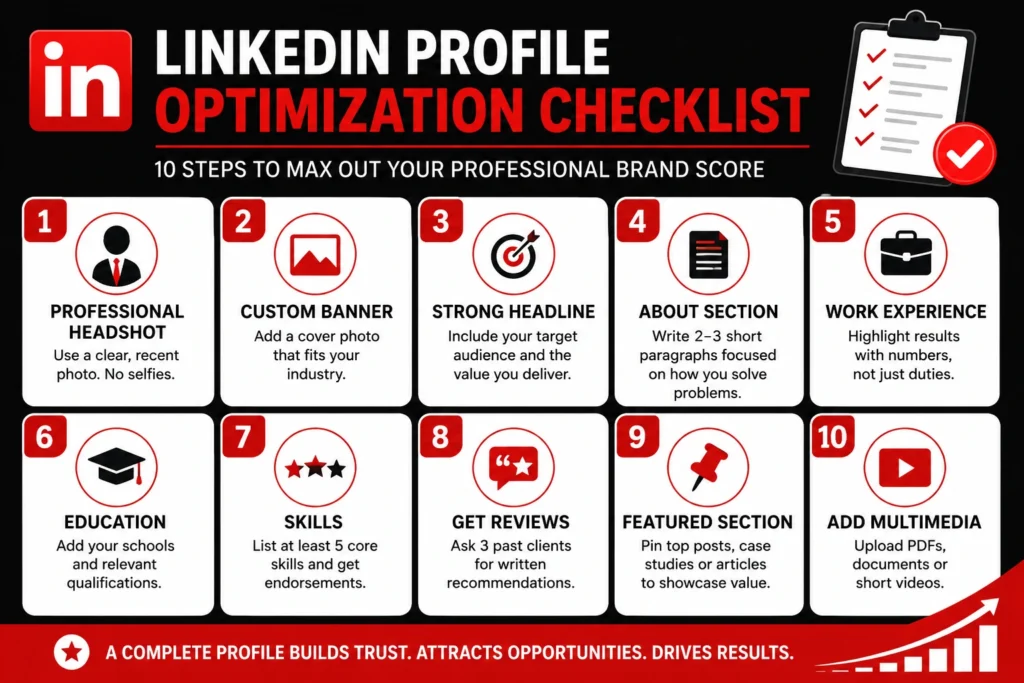
The profile optimization checklist
Complete these exact steps today. It will max out your professional brand score.
Advanced prospecting techniques
Scrolling the home feed is a waste of time. You will rarely find buyers that way. Use these targeted methods to master the second pillar of your score.
1. Boolean search strings
You need to use words like AND, OR, and NOT to narrow your search results.
If you want to sell to tech leaders in New York, type exactly this into the search bar: “Sales Director” AND “Technology” AND “New York”
2. Saved search automation
Do not do the same manual search every single day.
- Build a search for your perfect buyer.
- Hit the save button. Set up your alerts.
- Let LinkedIn email you when a new person matches your exact criteria.
3. The company following strategy
- Pick 20 target accounts you want to close this year.
- Follow their company pages.
- Track their hiring changes. Comment on their company posts to get noticed by their executive team.
4. Strategic group selection
- Find five active groups where your buyers actually hang out.
- Post a helpful tip in those groups once a week.
- Answer questions in the comments every single day.
Relationship building best practices
A massive network is useless if you never book a meeting. Here is exactly how I turn cold connections into warm sales calls.
First, you need a strict personalization framework. Always mention a specific post they recently wrote. Point out a shared interest or a mutual connection. Tell them exactly why you want to connect and be honest about it. Most importantly, never pitch your product in the very first message.
Next, you need a reliable follow up sequence. Do not just connect and disappear. On day one, send your custom connection request. Wait until day three to send them a link to a free article that solves a problem they have. By day seven, ask a simple question about their industry. On day fourteen, offer a warm introduction to someone in your network. Finally, on day thirty, ask for a quick 15 minute virtual coffee chat.
Your engagement must also be high quality. Never just type “great post.” Write at least three full sentences. Add a totally new perspective to the debate. Ask the author a question so they are forced to reply back to you. If someone leaves a comment on your own post, you must reply to them within 24 hours.
Tools and resources for SSI success
Doing all this manual work will burn you out. I use a few specific tools to speed up my workflow and get better data.
Start with LinkedIn native tools. Sales Navigator is the most powerful option. It gives you advanced search filters and lead tracking lists. This directly boosts your ability to find people and build relationships. LinkedIn Premium is a cheaper alternative that gives you more profile views and unlimited searches. You should also use the native content scheduler to plan your posts a week in advance so you never miss a day.
I also use a few third party tools to manage my time. Buffer and Hootsuite are great if you want to schedule your content outside of the native app. Canva is a free design tool I use to build clean graphics for my posts and a professional background banner for my profile. Finally, I use Shield. This is an advanced analytics tool that gives you deep data on exactly how your content performs over time.
Common SSI mistakes and how to avoid them
I see smart professionals make the same stupid errors every week. Avoid these traps.
- Treating your score like a vanity metric: You cannot just chase a high number. Your score reflects your real habits. Focus on being helpful to your buyers. The high number will naturally follow.
- Being inconsistent: Posting five times in one week and then vanishing for a month will tank your score. You must maintain a steady daily rhythm.
- Sending lazy requests: Never use the default connection message. I delete those instantly. Always write a custom note based on their profile.
- Ignoring your weak spots: Do not just focus on writing content if your connection score is terrible. Check your four pillars daily. Fix the lowest one first.
- Overstuffing your profile: Do not add so much text that your page becomes a giant wall of words. Only add information that actually helps your buyer make a buying decision.
- Trying to hit 100 on a free account: It is almost impossible to get a perfect score without paying for Sales Navigator. If LinkedIn is your main sales channel, you just need to pay for the premium tools.
Tracking and measuring your SSI progress
If you do not track it, you cannot grow it. You need to watch your numbers closely.
I build a simple Google Sheet to log my numbers every Monday morning. I write down my total score and the individual score of all four pillars. I also write down my main activity for that week. For example, week one might be fixing my profile text. Week two is posting three times. Week three is adding ten targeted leads. This shows me exactly what actions actually move the needle.
You also need clear monthly goals to avoid getting overwhelmed. In month one, focus only on fixing your professional brand by rewriting your profile. In month two, focus on your prospect list and start searching for your ideal customer. By month three, build your content engine and post three times a week without fail. In month four, focus entirely on nurturing your inbox to turn new connections into booked sales calls.
Do not just stare at the SSI score all day. Watch your actual business metrics. You know your strategy is working when your weekly profile views jump from 20 to over 50. Your connection acceptance rate should cross 60 percent. People will start leaving real comments on your daily posts. Your inbox will fill up with inbound messages. Most importantly, you will actually book more qualified sales calls every week.
Conclusion: Your SSI improvement action plan
Fixing your SSI score is not a game. It is a proven system. It turns a free social platform into an automated lead generation engine.
Here is exactly what you need to do right now.
Your immediate action for this week is simple. Log in and check your score. Write it down. Look at your four pillars and find the one with the lowest number. Spend one hour fixing your profile to hit All Star status. Then, block out 30 minutes on your calendar every single morning to do the daily work.
For the next 30 days, your goal is pure consistency. Post three times a week and never miss a single day. Leave five thoughtful comments a day on accounts you want to do business with. Send 15 custom connection requests to targeted buyers. Update your tracking spreadsheet every Monday morning.
Your vision for the next six months should be tied to revenue. Aim to break past a score of 70. Track exactly how many dollars in revenue came from your LinkedIn pipeline. Build a real reputation as an expert in your specific niche.
Your score is just a starting line. The real money comes from building actual trust with your market. Go to your SSI dashboard right now. Find your baseline. Start doing the work.
Frequently Asked Questions
What is a good LinkedIn SSI score?
A good LinkedIn SSI score is 70 or higher. If you score below 40, your profile needs serious work. Scores between 40 and 69 mean you have a solid foundation but lack daily consistency. I always tell my clients to aim for at least 75 to start generating real inbound leads.
How do I find my LinkedIn SSI score?
You can find your score by logging into your account and visiting linkedin.com/sales/ssi
in your browser. LinkedIn hides this tracking dashboard from your main profile page. You must type that exact link to view your private metrics.
How often does LinkedIn update your SSI score?
LinkedIn updates your SSI score every 24 hours. The algorithm recalculates your networking habits overnight. This daily refresh is incredibly useful. You can test a brand new commenting strategy today and see the exact impact on your number tomorrow.
Can I improve my SSI score without Sales Navigator?
Yes, you can improve your score using a free account. But hitting a perfect 100 is almost impossible without paying for a premium subscription. Sales Navigator unlocks advanced search filters and lead lists. These paid features automatically boost your score in the prospecting pillar.
Why is my LinkedIn SSI score dropping?
Your score drops because you stopped being active. The index is a dynamic, rolling metric. If you stop publishing posts, ignore your direct messages, or stop leaving comments, the algorithm lowers your rank. You have to maintain your daily habits to keep your number high.