
How to Do Keyword Research: 9 Methods From Basics to Full Automation (2026)
TL;DR
- Keyword research is how you find what people are actually searching for. You decide whether it’s worth creating content for it.
- You don’t need a paid tool to start. Google Keyword Planner, Google Trends, and Google Search Console are free and powerful enough to build a solid keyword strategy from scratch.
- When you’re ready for paid tools, Semrush and Ahrefs give you competitive data and traffic potential numbers that free tools can’t match.
- Claude and ChatGPT are best used for strategy and topic architecture, not for generating search volume data. Always validate with a real tool.
- You can fully automate keyword research pipelines using n8n and DataForSEO. Claude Code takes it further by analysing your actual GSC data on command.
Most content plans fail before the first word is written. Not because of bad writing or a weak strategy. Nine times out of ten, the keyword selection was wrong from the start.
Keyword research is how you find the exact terms people type into search engines, assess whether there is real demand behind them, and decide which ones are worth your time. Get it right and your content builds compounding traffic. Get it wrong and you are publishing into a void.
This guide covers nine different methods, from completely free to fully automated. Each one is different. You don’t need all nine. You need to understand which ones serve which purpose and when to reach for each. Start at the beginning and work your way through. By the end, you’ll have a full toolkit and a workflow that runs itself.
What Is Keyword Research?
Keyword research is the process of discovering the words and phrases people type into search engines when looking for information, products, or solutions. It tells you what search demand exists for any topic, how competitive that topic is to rank for, and how to structure your content to match what searchers actually want.
Every piece of content you publish targets at least one keyword. Even if you never consciously chose it. Keyword research is the discipline of making that choice deliberately, finding terms that have real search demand, a realistic chance of ranking, and clear relevance to your business or content strategy.
Search has expanded too. Your audience now searches in Google, Bing, YouTube, and increasingly in AI tools like ChatGPT and Perplexity. A complete keyword research approach covers all of these surfaces, not just the traditional Google SERP.
With that settled, here are the nine methods. Let’s start from the ground up.
Method 1: Google Keyword Planner (Free)
Cost: Free | Best for: Seed keyword discovery, CPC data, search demand validation
Google Keyword Planner is the most underrated free keyword research tool available. It was built for Google Ads advertisers, but SEOs have been using it for years because it’s the only tool powered directly by Google’s own search data.
You need a Google Ads account to access it. You do not need to run an ad or spend any money. The account requirement trips people up. They assume it costs something. It doesn’t. Create an account, skip the campaign setup, and go straight to the Keyword Planner under Tools and Settings → Planning.
How to Access It
- Go to ads.google.com and create or sign into your Google Ads account.
- Click Tools and Settings in the top navigation. Select Planning → Keyword Planner.
- When prompted to set up a campaign, click ‘Explore your account’ or ‘Skip.’ Do not create a campaign.
- You’re in. You’ll see two options: ‘Discover new keywords’ and ‘Get search volume and forecasts.’
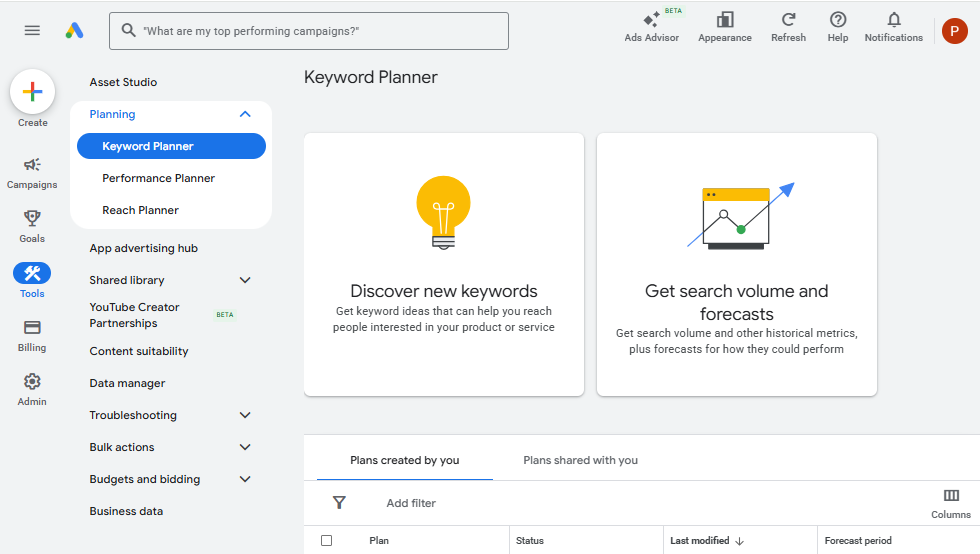
Discover New Keywords
This is the primary mode for keyword research. Enter a seed keyword, a broad term related to your topic, and Keyword Planner returns hundreds of related keyword ideas with approximate search volume and competition data.
You have two input options. ‘Start with keywords’ lets you enter phrases directly. ‘Start with a website’ lets you enter a URL, your own site or a competitor’s, and Google suggests keywords based on the page content. The website option is particularly useful for competitor research. Enter a competitor’s top-performing page and Google tells you what topics that page appears to target.
Get Search Volume and Forecasts
If you already have a list of keywords from another source, a competitor analysis, a ChatGPT brainstorm, or a Reddit thread, paste them here. Keyword Planner returns search volume estimates and CPC data for each one. This is a fast way to validate a list you’ve built elsewhere.
The Volume Range Problem and How to Work Around It
Here’s the catch: Google Keyword Planner shows search volume as ranges unless your account has active ad spend. You’ll see ‘1K–10K’ instead of ‘4,200.’ Seeing that range instead of an exact number is genuinely frustrating when you’re trying to make a content decision. It’s designed for advertisers who need rough estimates, not writers who need precision.
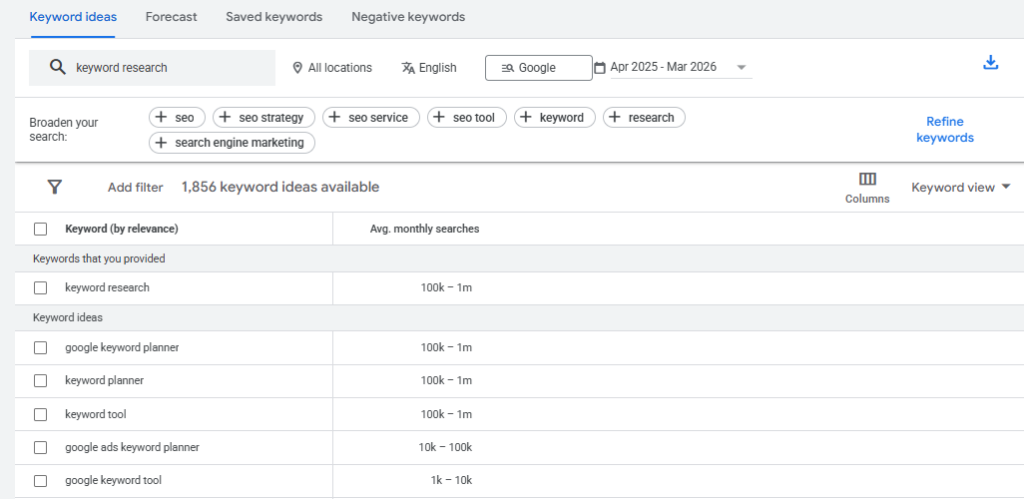
The workaround is easy. Export your keyword list from Keyword Planner as a CSV and paste it into Ahrefs’ free keyword generator or Ubersuggest. Both tools return more precise volume estimates for free. Use Keyword Planner for discovery and competitor insight, then validate with a more precise tool.
PRO TIP
The CPC column in Keyword Planner is one of its most valuable features for keyword prioritisation. High CPC keywords mean advertisers are willing to pay for that traffic. That’s a signal of commercial intent and proven buyer interest. Even if you’re focused on organic SEO, sorting by CPC helps you find keywords that lead to revenue, not just traffic.
Keyword Planner tells you what demand looks like today. Google Trends tells you whether that demand is growing, declining, or seasonal.
Method 2: Google Trends (Free)
Cost: Free | Best for: Trend direction, seasonal patterns, keyword comparison, rising topics
Google Trends shows the relative search interest for any keyword over time. It doesn’t show exact search volume. It shows a score from 0 to 100 where 100 represents peak interest in the selected time window. This is important to understand right out of the gate: it’s a directional tool, not a volume tool.
No account required. Go to trends.google.com and start searching.
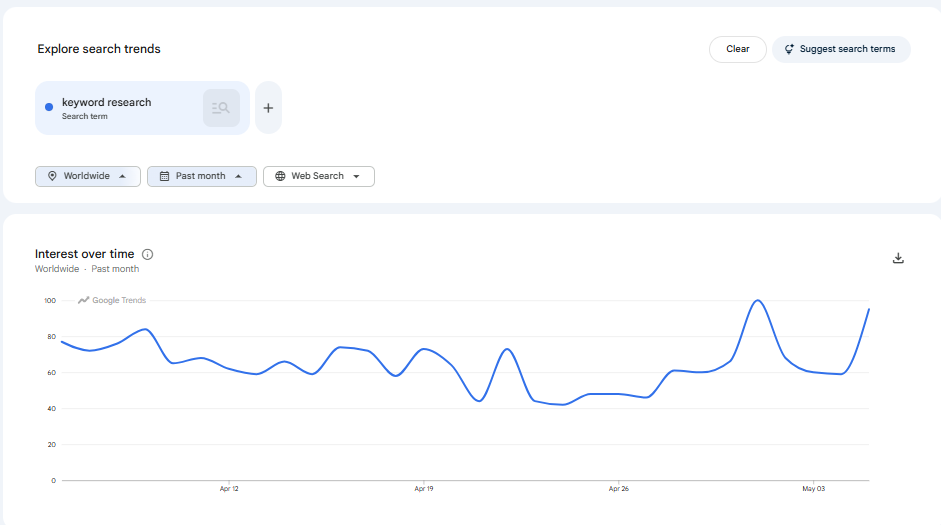
Explore Page: Your Primary Research Tool
The Explore page is where keyword research happens. Enter any keyword and you’ll see a line graph of interest over time. Filter by country, time range, category, and search type including Web, Image, YouTube, News, and Shopping.
The most useful features for keyword research are the ‘Related queries’ and ‘Related topics’ tables at the bottom of the results page. These show keywords that people also search alongside your main keyword. ‘Top’ shows the most popular related queries. ‘Rising’ shows queries gaining momentum. The most valuable discoveries in that Rising tab are keywords with ‘Breakout’ status, meaning search interest has grown over 5,000%.
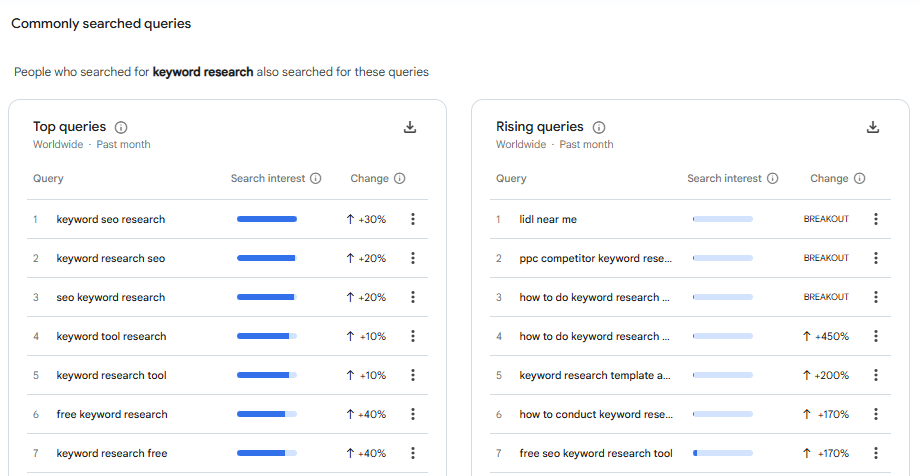
Compare Keywords
Enter up to five keywords on the same graph to see which one has stronger relative interest. This is useful when you’re choosing between two related topic options and want to see which direction demand is trending. Two keywords with similar Keyword Planner volumes might show very different trend trajectories, one declining and one rising. Always pick the rising one.
Seasonal Patterns
Change the time range to ‘Past 5 years’ and you’ll immediately see whether your keyword has seasonal demand spikes. A topic that peaks every December needs a different publishing calendar than one with steady year-round demand. Publish seasonal content at least six to eight weeks before peak interest. Google needs time to crawl, index, and build authority before the traffic wave arrives.
Trending Now
The Trending Now tab shows real-time search trends, topics gaining rapid momentum right now. This is more relevant for news-focused sites than evergreen content blogs, but it’s worth checking weekly for any emerging topic in your niche that you could get ahead of.
In 2025, Google moved the Trending Now dashboard to update every ten minutes, making it genuinely useful for fast-moving industries where trending topics can become high-value ranking opportunities within days.
IMPORTANT LIMITATION
Google Trends shows relative interest, not absolute search volume. A score of 50 does not mean 50 searches. It means half the interest level of the peak moment in the selected time frame. Always pair Trends data with Keyword Planner or a paid tool to get actual volume estimates before making a content decision.
Keyword Planner and Trends show you potential. Search Console shows you reality: what your site actually ranks for right now.
Method 3: Google Search Console (Free)
Cost: Free | Best for: Finding ranking keywords you aren’t targeting, CTR gap analysis, content update opportunities
Google Search Console is the most underused free tool in SEO. Most people check it to verify indexing and move on. Experienced content teams mine it weekly for keyword opportunities hiding in plain sight.
The gold is in the gap between impressions and clicks. An impression means your page appeared in search results for that query. No click means either the ranking is too low, or the title and meta description aren’t convincing enough. Both are fixable.
Finding Keyword Opportunities in GSC
- Go to Search Console → Performance → Search Results.
- Click the Queries tab. You’ll see every search query your site has appeared for.
- Sort by Impressions descending. You’re looking for queries with high impressions but low clicks.
- Filter for positions 5 to 20. These are queries where you rank but not on page one, or you’re sitting at the very bottom of it. These are the most actionable quick wins.
- Add those keywords to your content plan. Either create a dedicated article or update an existing one to better target that query.
Search Console is also your most honest source of zero-volume keyword discoveries. Tools like Ahrefs and Semrush only show keywords with measurable search volume. GSC shows every query someone typed that triggered your result, including long-tail queries that show zero volume in paid tools but clearly have real searchers behind them.
Three free tools covered. This next one requires no account, no login, and no tool at all.
Method 4: Google Autocomplete and People Also Ask (Free)
Cost: Free | Best for: Long-tail keyword discovery, question-format keywords, topic ideation
Google Autocomplete is Google’s own real-time keyword research tool. Every suggestion that drops down when you type into the search bar is a real query that real people have searched. Google wouldn’t suggest it if nobody searched it.
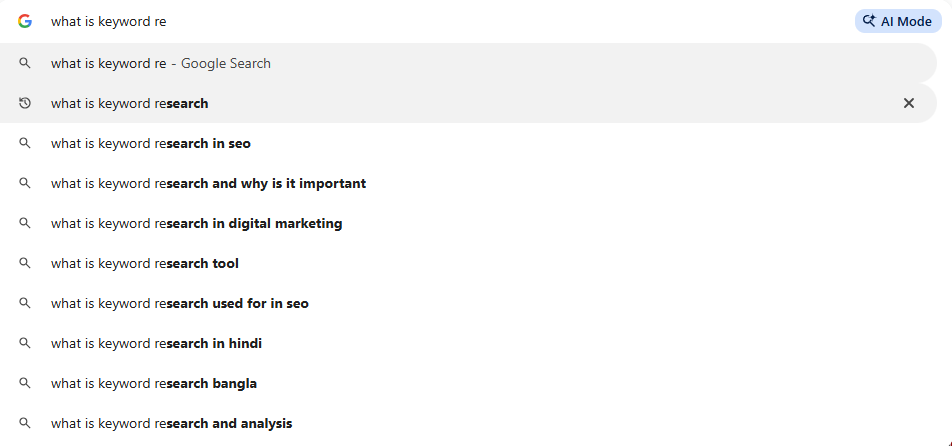
Type your seed keyword and stop before hitting Enter. Write down every suggestion. Then add a letter after your seed keyword and do it again. ‘keyword research a,’ ‘keyword research b,’ and so on. It takes ten minutes and generates fifty long-tail keyword ideas that are all validated by actual search behaviour.
People Also Ask
Search any keyword and scroll past the first few results. You’ll find the People Also Ask (PAA) box, a set of questions that Google knows searchers want answered alongside the main query. Click any question to expand it. The section generates more questions as you interact with it.
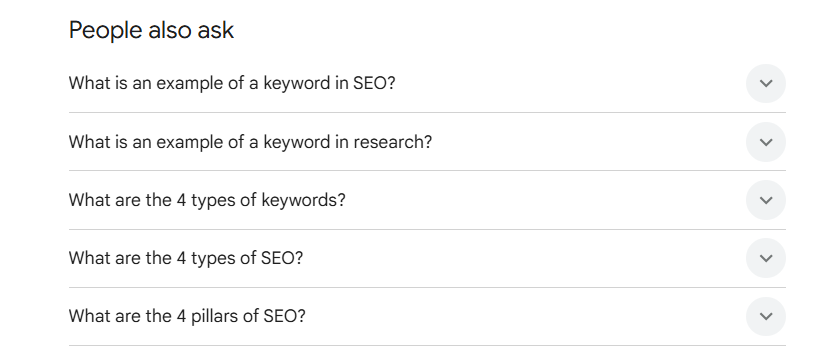
PAA questions are pre-validated keyword ideas in question format. They’re excellent for informational content, FAQ sections, and identifying the sub-topics your article needs to cover. A single seed keyword can generate fifteen to twenty PAA questions in under five minutes.
Answer the Public
Answer the Public at answerthepublic.com automates the autocomplete mining process. Enter a seed keyword and it pulls all the autocomplete variations across question formats including who, what, when, where, why, and how, plus preposition formats like for, with, near, and without. It gives you a visual map of every way people phrase a search around your topic.
The free version limits you to three searches per day. Three searches per day sounds stingy. For occasional research on one or two topics it’s plenty. For a content agency running ten projects, you’ll hit the limit before lunch. The paid plan starts at around $9 per month and removes the cap entirely.
The four free methods above give you a solid foundation. When you’re ready to invest in a paid tool, Semrush is one of the two worth paying for.
Method 5: Semrush (Paid)
Cost: From $139/month | Best for: Keyword discovery at scale, competitor analysis, intent classification, AI visibility tracking
Semrush is a full marketing suite. For keyword research specifically, three tools inside it do the heavy lifting: Keyword Overview, the Keyword Magic Tool, and the Keyword Gap tool.
Keyword Overview
Enter any keyword into Keyword Overview and you get an instant dashboard: exact monthly search volume, keyword difficulty score from 0 to 100, CPC, search intent classification, search trend graph, and a SERP preview showing what currently ranks.
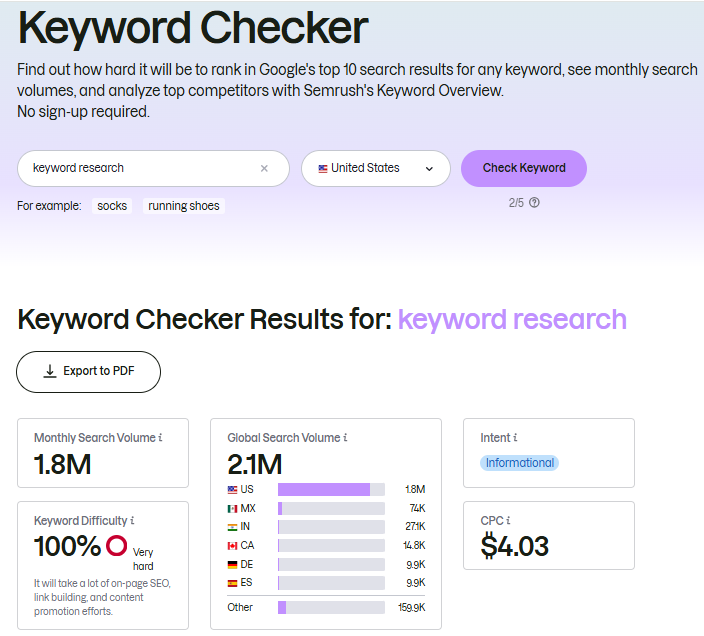
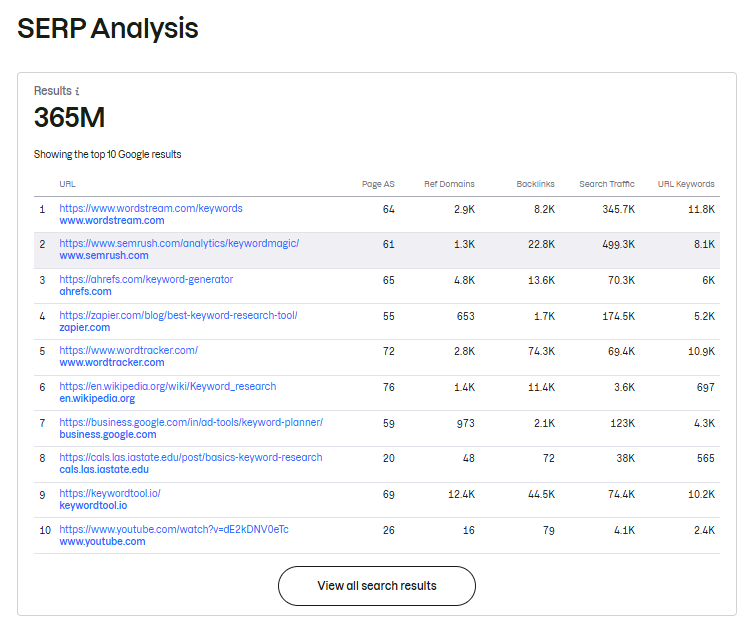
The intent classification is particularly useful for filtering at scale. You can look at a keyword and know immediately whether the people searching it are in learning mode or buying mode. That shapes what content format and conversion goal you target.
Keyword Magic Tool
This is Semrush’s bulk keyword generator. Enter a seed keyword and it returns thousands of related keyword ideas, each with volume, KD, intent, CPC, and a search trend indicator. You can filter by intent, word count, volume range, and KD range.
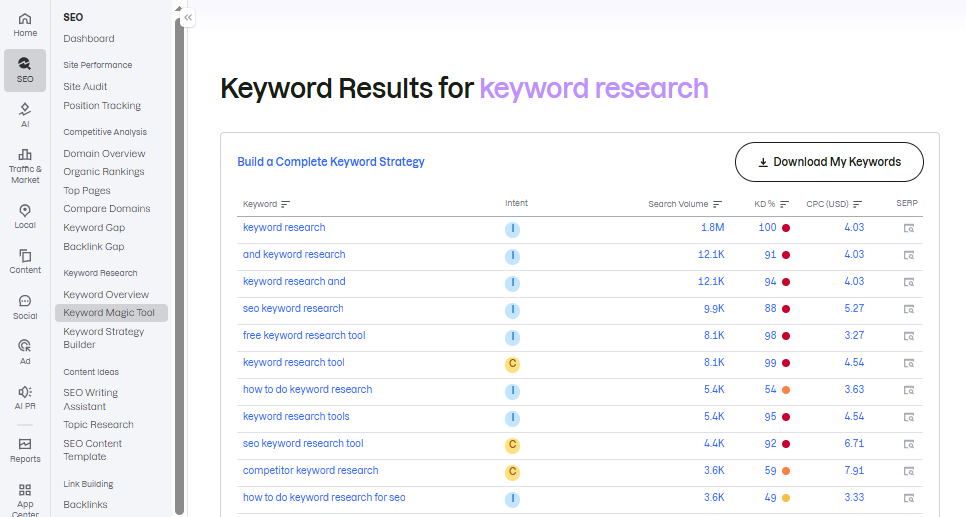
The workflow that works: enter your seed keyword, filter by your target intent (usually informational for B2B content marketing), then sort by KD from low to high. This surfaces all the low-competition opportunities first. If you’re on a newer site, set a KD cap of 20 to 30 and only look at those results.
Keyword Gap Analysis
Enter your domain alongside two or three competitor domains and Semrush shows you keywords that competitors rank for that you don’t. These are pre-validated opportunities because the competitors have already proven that content on these topics can rank. Your job is to produce something more useful.
Filter the gap results for keywords where at least two competitors rank in positions 1 to 10, and your site ranks nowhere. Those are the clearest opportunities where demand is proven and your absence is notable.
AI Visibility Toolkit (2026 Addition)
Semrush added AI visibility tracking to their toolkit in 2026. It tracks whether your content is being cited in AI Overviews and other AI-generated search results. For any keyword you’re tracking, you can see whether your page or a competitor’s page is being cited in the AI Overview response.
This is the tool to use when you’re doing keyword research for AI visibility, not just traditional Google rankings.
Semrush and Ahrefs do similar jobs. Where they differ is worth knowing before you choose.
Method 6: Ahrefs (Paid)
Cost: From $129/month | Best for: Traffic potential accuracy, competitor backlink analysis, content gap discovery
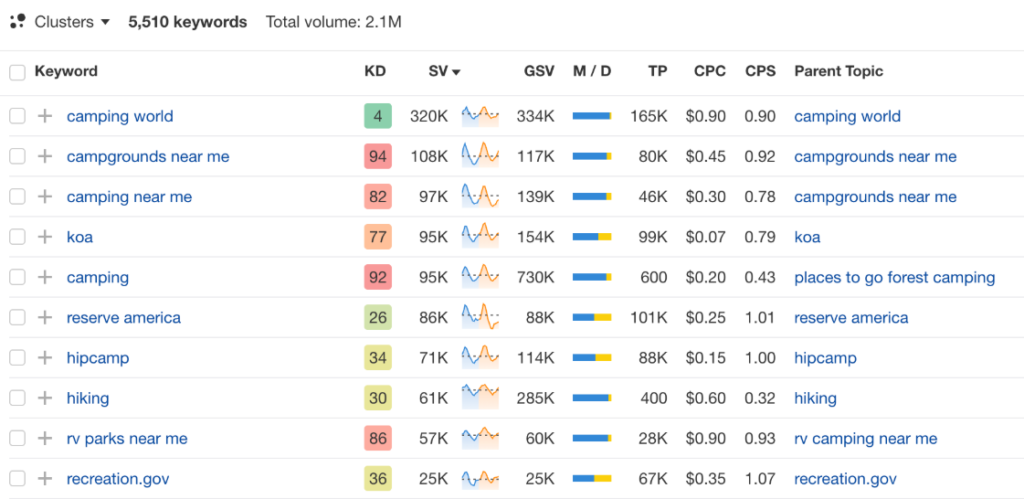
Ahrefs has long been considered the most accurate tool for backlink data and organic traffic estimates. Its keyword research functionality is excellent, but the standout feature for keyword research is something called Traffic Potential, a metric that Semrush doesn’t show in the same way.
Traffic Potential vs. Search Volume
Search volume tells you how many times a keyword is searched per month. Traffic Potential tells you how much organic traffic the top-ranking page for that keyword actually receives. These numbers are often very different because top-ranking pages rank for hundreds of related keywords simultaneously.
A keyword with 800 monthly searches might have a Traffic Potential of 3,500 because the page that ranks first also captures traffic from ‘how to do keyword research free,’ ‘keyword research guide,’ ‘keyword research step by step,’ and fifty other related queries.
Traffic Potential is a better signal for content investment decisions. Always look at it alongside search volume, not instead of it.
Keywords Explorer
Enter a seed keyword into Keywords Explorer and choose ‘Matching terms’ to see all keywords that contain your seed terms, or ‘Related terms’ to see semantically related keywords that don’t necessarily contain your exact phrase. Related terms is particularly useful for building topical coverage, finding the adjacent concepts that build authority around your main topic.
Competing Domains
In Site Explorer, the Competing Domains report shows websites that rank for the same keywords as yours. These are your true organic competitors, not just the ones you know about. Click any competitor and run the Content Gap report to find the specific keywords they rank for that you don’t. This is Ahrefs’ equivalent of Semrush’s Keyword Gap tool and it’s equally powerful.
Ahrefs Free Tools
Ahrefs offers a free keyword generator at ahrefs.com/keyword-generator. Enter a seed keyword and get 20 phrase-match suggestions and 20 question-based suggestions, all with KD scores and rough search volumes. No account required. For new sites starting from scratch with no budget, this is worth bookmarking before anything else.
| Feature | Semrush | Ahrefs |
| Keyword volume accuracy | Strong, slight overestimation on some terms | Strong, consistent with GSC data |
| Traffic potential metric | Not shown directly | Best-in-class, shown for every keyword |
| Intent classification | Automatic label on every keyword | Manual inference, no automatic label |
| Competitor analysis | Strong, Keyword Gap is excellent | Strong, Content Gap and Competing Domains |
| AI visibility tracking | AI Visibility Toolkit (2026) | Brand Radar, tracks LLM mentions |
| Free tier | 10 Keyword Magic searches per day | Free Keyword Generator and Webmaster Tools |
| Best for | Broader marketing suite and content planning | SEO-specific depth and backlink analysis |
Paid tools handle data. AI tools handle strategy. Here’s where the distinction matters.
Method 7: ChatGPT for Keyword Research
Cost: Free (GPT-4o) or $20/month (ChatGPT Plus) | Best for: Brainstorming seed keywords, topic cluster generation, keyword ideation before tool validation
ChatGPT cannot look up real search volume data. It does not know how many times a keyword is searched per month, and any number it gives you is fabricated. It will confidently tell you a keyword gets 12,400 searches per month. It made that number up. Don’t use it for volume data.
What ChatGPT does well is generating large volumes of keyword ideas quickly, mapping them to funnel stages, and thinking through the searcher’s perspective. Use it for ideation. Use tools for validation.
Prompt 1: Seed Keyword Brainstorm
I'm creating content about [your topic].
Give me 30 seed keywords someone might search for
when trying to learn about or solve problems related to this topic.

Organise them into three groups:
- Awareness (learning, exploring)
- Evaluation (comparing, deciding)
- Action (ready to do or buy)

Do not make up search volumes. These are ideas I'll validate in a keyword tool.
Prompt 2: Long-Tail Keyword Expansion
Take this keyword: [your target keyword]

Give me 20 long-tail variations a person might search
depending on their level of knowledge:
- Complete beginner (first time hearing about this)
- Intermediate (knows the basics, wants to go deeper)
- Advanced (expert, wants specific tactics or tools)

Format as a simple list. No explanations needed.
Prompt 3: Related Question Clusters
For the topic [your topic], give me the 10 most common
questions someone would ask at each of these stages:

1. Before they understand the topic (confusion stage)
2. While they're learning it (understanding stage)
3. When they're trying to implement it (execution stage)

These become my FAQ targets. Format as full questions,
not keywords.
The output from these prompts gives you a keyword architecture to validate. Paste the lists into Ahrefs’ Free Keyword Generator or Semrush’s Keyword Magic Tool. Some will have zero volume. Some will surprise you with more demand than you expected. The ChatGPT output is a starting point, not a final answer.
ChatGPT generates ideas. Claude builds strategy. The difference becomes clear the moment you set it up correctly.
Method 8: Claude for Keyword Research
Cost: Free (Claude.ai) or $20/month (Pro) | Best for: Topic cluster strategy, AEO and LLM keyword identification, content brief generation
Claude’s biggest advantage for keyword research is its Projects feature. Unlike a standard chat session, a Claude Project holds persistent context. You set it up once with your site details, audience, content strategy, and existing articles. Every subsequent keyword research conversation starts with that context already loaded.
Context changes everything in keyword research. A keyword that’s right for one site is wrong for another. Most people never set up the Project context and then wonder why their AI keyword research feels generic. Five minutes of setup fixes that entirely.
Setting Up Your Claude Project for Keyword Research
Create a project in Claude.ai and paste the following into the Instructions field:
Site: [your URL]
Niche: [your niche in one sentence]
Target audience: [who reads your site]
Content categories: [your site's content categories]
Existing articles: [paste titles of published articles]
Affiliate/monetization targets: [products or tools you promote]

When I ask for keyword research help, always consider this context.
Never make up search volumes. Generate conceptual keyword patterns
I will validate in Ahrefs or Semrush.
Prompt 1: Topic Cluster Generation
Using my site context, give me a list of topic cluster themes
for the category [category name].

For each theme, tell me:
- What stage of the journey it targets (TOFU / MOFU / BOFU)
- What the searcher wants when they land on this content
- What format the content should take (guide / comparison / how-to / definition)

Focus on practical themes, not broad category labels.
Maximum 15 topics.
Prompt 2: Keyword Patterns by Funnel Stage
For the topic: [topic name]

Give me keyword patterns across the funnel:

TOFU: 5 question-format or 'what is' type keyword patterns
MOFU: 5 how-to or process-focused keyword patterns
BOFU: 5 comparison, 'best', or tool-specific keyword patterns

For each pattern give me 2 example keywords in that format.
These are patterns I will validate -- do not invent search volumes.
Prompt 3: LLM and AEO Keyword Identification
This prompt finds keywords optimised for AI Overviews, Featured Snippets, and LLM citation. It’s the unique angle that ChatGPT prompts don’t address.
For the topic [topic name], identify keyword patterns that are likely to appear in:

1. Google AI Overviews (direct answer queries starting with 'what is',
   'how does', 'what are the types of')
2. Featured Snippets (definition queries, list queries, step-by-step queries)
3. LLM citation in ChatGPT or Perplexity (authoritative comparison or
   definitional queries where AI tools cite sources)

For each type, give me:
- 3 example keyword patterns
- The content structure that earns that placement
- The key element that makes a page citable vs. uncitable for that type
Prompt 4: Content Brief Generator
Once you have a keyword validated in a tool, use this prompt to generate a content brief in under a minute:
Keyword: [keyword]
KD: [score]
Monthly searches: [volume]
SERP format: [what you saw ranking: guides / comparisons / definitions]

Using my site context, give me:
1. Recommended content format and why
2. Ideal H1 and meta title
3. 5-6 H2 sections to cover
4. Direct answer box text (60 words max, for Featured Snippet targeting)
5. 3 relevant internal links from my existing articles
6. One angle I can take that competitor pages likely miss
Methods 7 and 8 use AI conversationally. Claude Code is different. It’s a command-line tool that writes and runs code with your actual data. The difference in output is significant.
Method 9: Claude Code for Advanced Keyword Analysis
Cost: Usage-based, approx $5 to $30/month for typical SEO workflows | Best for: GSC data analysis, paid vs organic gap detection, AI citation tracking, bulk keyword analysis
When you ask Claude.ai to analyse your keyword data, you get a description of what the analysis could look like. When you run Claude Code inside a project directory that contains your actual GSC exports, you get the analysis itself, with your real numbers, your actual pages, and specific recommendations tied to your own data.
That gap is everything. Claude Code is not a text generator for SEO tasks. It’s a data analyst that works with your numbers.
Setting Up Claude Code for GSC Keyword Analysis
Install Claude Code from the terminal: npm install -g @anthropic-ai/claude-code. Then set up a project directory:
mkdir seo-research && cd seo-research
mkdir data reports
Export your Google Search Console data: go to Performance → Search Results → Queries, set the date range to 90 days, and download the CSV. Drop it into the /data folder in your project directory.
Open Claude Code in your project directory by running: claude. Claude Code reads the files in your directory and can immediately start analysing them.
Keyword Analysis Commands to Run
Once Claude Code is running in your project directory with GSC data loaded, you can run natural language commands:
Analyse my GSC data. Find the top 20 queries where
I have over 200 impressions but fewer than 10 clicks.
For each one, estimate the potential click gain if I moved
from my current position to position 3.
Look at my GSC query data. Find any queries where
two or more of my pages are both appearing in results
for similar keywords. Flag these as potential
keyword cannibalization issues.Based on my GSC impression data, what topic clusters
are generating the most visibility? Which clusters have
high impressions but no dedicated pillar content?
List the top 5 gap opportunities.AI Citation Tracking With Claude Code and DataForSEO
The most advanced use of Claude Code for keyword research is tracking whether your content gets cited in AI Overviews. DataForSEO’s AI Overview API lets you pull the AI Overview response for any keyword at roughly $0.01 per query and see which URLs Google’s AI cites.
I have a CSV of 50 target keywords.
For each keyword, call the DataForSEO AI Overview API
and check whether any of my pages are cited in the
AI Overview response.

Summarise: which of my pages are being cited?
Which keywords have AI Overviews where I'm NOT cited
but a competitor is? Save the output to reports/ai-gaps.md
Running this analysis once a month tells you exactly where your content is earning AI visibility and where it’s invisible. It’s the most actionable data in keyword research right now, and it’s not available in any standard tool dashboard. You build it yourself with Claude Code.
REAL PRACTITIONER EXAMPLE
After running this analysis on a content site, the gap report showed one post had 12 times more AI Overview citations than a nearly identical companion piece targeting similar intent. Traditional rank tracking showed both articles ranking similarly. The AI citation data triggered a consolidation decision that wouldn’t have been visible any other way. This is the kind of insight Claude Code surfaces. Nothing else does.
Nine methods down. The final section is about making them run without you having to be present.
How to Automate Keyword Research With n8n
Cost: n8n free (self-hosted) or from $24/month cloud. DataForSEO: $1 free credit on signup, then approx $0.0002 per request | Best for: Recurring keyword research, automated rank monitoring, keyword brief pipelines
n8n is a visual workflow automation platform. Think Zapier or Make, but open-source and self-hostable. You connect nodes visually to build automated workflows that run on a schedule or trigger. n8n looks intimidating the first time you open it. Give it 30 minutes. The visual node interface clicks surprisingly fast.
For keyword research, n8n’s power comes from combining the DataForSEO API, which provides real-time keyword data, autocomplete suggestions, and SERP results, with Google Sheets for storage and Claude or OpenAI for analysis. The result is a keyword research pipeline that runs itself.
What You Need to Get Started
- n8n account: Free at n8n.io (cloud), or self-hosted using Docker. The cloud free tier is enough for light automation.
- DataForSEO account: Free to create. You get $1 in credit on signup, enough to test all three workflows below. Paid plans are pay-as-you-go from approximately $0.0002 per request.
- Google account: For Google Sheets output and optional Search Console integration.
Workflow 1: Autocomplete Keyword Discovery Pipeline
This workflow takes a list of seed keywords from a Google Sheet and automatically fetches Google Autocomplete suggestions for each one using the DataForSEO API. Results are appended back to a separate sheet tab.
- Create a Google Sheet with two tabs: ‘Input’ (seed keywords with a ‘Status’ column) and ‘Results’ (where suggestions will be written).
- In n8n, create a workflow with a Manual Trigger or Schedule Trigger node.
- Add a Google Sheets node: Action = ‘Get Rows,’ Sheet = ‘Input.’ Filter for Status = ‘Ready.’
- Add an HTTP Request node. URL: the DataForSEO Labs API autocomplete endpoint. Method: POST. Authentication: Basic (your DataForSEO login and API key). Body: pass the seed keyword from the previous node.
- Add a Code node to parse the API response and extract the autocomplete suggestion array.
- Add a Google Sheets node: Action = ‘Append Row,’ Sheet = ‘Results.’ Map the suggestion text and original seed keyword to columns.
- Run the workflow. Your Results sheet fills automatically with autocomplete variations for every seed keyword.
Workflow 2: Weekly GSC Impression Opportunity Report
This workflow runs every Monday, pulls your Google Search Console data, identifies the highest-impression queries with the lowest CTR, and sends a summary to your email or Slack.
- Add a Schedule Trigger: Every Monday at 8am.
- Add a Google Search Console node (available via HTTP Request to the GSC API, or through community n8n nodes). Pull 30 days of query data.
- Add a Code node: filter for queries with Impressions greater than 100 and CTR under 3%. Sort by Impressions descending. Take the top 15.
- Add an OpenAI or Claude API node: pass the filtered list and ask for a brief analysis of which queries represent the best content opportunities based on current position and click gap.
- Add a Gmail or Slack node: send the summary to your inbox every Monday morning.
Once this is running, you get a weekly keyword opportunity report in your inbox without opening Search Console. The AI analysis adds context to the raw data, flagging which keywords are likely ranking-gap issues versus CTR-gap issues.
Workflow 3: Competitor Keyword Monitoring
This workflow runs weekly and tracks whether a competitor has published new content targeting keywords you should own. It uses DataForSEO’s SERP analysis endpoint.
- Create a Google Sheet with your list of target keywords and a ‘Last Checked’ date.
- Add a Schedule Trigger: Every Sunday.
- Loop through each keyword in the sheet. For each one, call DataForSEO’s SERP analysis endpoint to get the current top 10 results for that keyword.
- Check whether a competitor domain appears in the top 10 for keywords where you don’t currently rank.
- Append new competitor entries to a ‘Competitor Alerts’ sheet.
- Send a weekly Slack message summarising new competitor pages detected.
This workflow catches competitor content moves the moment they start ranking, giving you the earliest possible signal to respond with better content.
COST REALITY CHECK
Running all three workflows once per week with a keyword list of 100 terms costs approximately $0.20 to $0.50 per week in DataForSEO API credits. At that price, fully automated keyword research is not a luxury for large teams. It’s accessible to anyone running a content site seriously.
Nine methods give you a lot of keywords. The last step is knowing which ones to pursue first.
How to Prioritise Your Keyword List
Once you have keywords from multiple methods, you need a scoring system. Without one, you’ll default to chasing the highest volume, which is the fastest way to waste six months on content that never ranks.
Use these four factors to score every keyword before adding it to your content calendar:
| Factor | What to Check | Score 1 (Low Priority) | Score 2 (Medium) | Score 3 (High Priority) |
| Keyword Difficulty | KD score in Ahrefs or Semrush | KD 40+ | KD 20-40 | KD 0-20 |
| Traffic Potential | Ahrefs Traffic Potential metric | Under 100/mo | 100-500/mo | 500+/mo |
| Business Relevance | Does this lead to a conversion or affiliate click? | Tangentially related | Related | Directly tied to revenue |
| Coverage Gap | Do you already have content on this? | Covered well already | Partial coverage | Zero coverage |
Score each keyword on all four factors from 1 to 3. Target keywords that score 9 or above first. A keyword scoring 12 out of 12 is a ‘publish this week’ priority. A keyword scoring 5 or below goes on a future list.
The devil is in the details here. Two keywords with the same total score can look very different when you examine why they scored that way. Always read the components, not just the total. A score of 9 built on three 3s is better than a score of 9 built on a 1, a 5, and a 3 where the weak factor is business relevance.
The Bottom Line
You don’t need all nine methods. You need the right ones for where you are right now.
If you’re starting from scratch with no budget: Google Keyword Planner, Google Trends, Search Console, and Autocomplete will take you further than most people get with paid tools. Get comfortable with those four before spending anything.
When you’re ready to invest: add Ahrefs or Semrush. Use Claude Projects to bring strategic context to your keyword decisions. Run Claude Code to analyse your actual GSC data instead of guessing from aggregate reports.
When keyword research needs to scale: build the n8n workflows. A properly configured automation stack means your site is monitoring competitors, surfacing impression gaps, and discovering new keyword opportunities every single week, without you having to remember to check.
Keyword research done right is never really finished. The search landscape shifts, competitors publish new content, and AI tools change what queries look like. The teams that win treat it as a continuous process, not a one-time exercise before a content calendar gets locked.
Hit the ground running with the free tools. Build up from there. The whole picture of your on-page SEO strategy gets clearer with every data point you add.
Frequently Asked Questions
What is keyword research and why does it matter?
Keyword research is the process of finding the exact words and phrases people type into search engines, assessing the search demand behind them, and identifying which terms are worth creating content for. It matters because without it, you’re publishing based on guesswork. With it, you know what demand exists before you invest time in writing.
Can I do keyword research for free?
Yes. Google Keyword Planner, Google Trends, Google Search Console, and Google Autocomplete are all free and together provide enough data to build a solid keyword strategy. Google Keyword Planner requires a free Google Ads account but no ad spend. Ahrefs also offers a free keyword generator tool that requires no account at all.
What is keyword difficulty and what score should I target?
Keyword difficulty (KD) is a score from 0 to 100 estimating how hard it is to rank for a keyword based on the backlink profiles of pages currently in the top 10. For new sites with low domain authority, target KD 0 to 20. As your domain authority grows to 30 to 40, keywords up to KD 35 become realistic. Head terms above KD 50 typically require significant authority and backlinks to compete for.
What is traffic potential and how is it different from search volume?
Search volume is the average number of monthly searches for a specific keyword phrase. Traffic potential (a metric in Ahrefs) shows the total organic traffic the top-ranking page for that keyword actually receives, which is usually much higher than the stated volume because the page also ranks for dozens of related keywords simultaneously. Traffic potential is a more accurate signal for content investment decisions.
How do I use Claude for keyword research?
Create a Claude Project and add your site context to the Instructions field, covering your niche, audience, content categories, and existing articles. Then use Claude with structured prompts to generate topic clusters, keyword patterns by funnel stage, and LLM or AEO keyword opportunities. Claude cannot provide real search volume data, so always validate its output in Ahrefs or Semrush before committing to a keyword
What is n8n and how can I use it for keyword research automation?
n8n is a visual workflow automation platform, open-source and self-hostable. For keyword research, you can use n8n with the DataForSEO API to build automated workflows that fetch autocomplete suggestions, pull competitor SERP data, and monitor your Google Search Console for new ranking opportunities. The DataForSEO API costs approximately $0.0002 per request, making full automation accessible even for individual content creators.