What Is B2B Data? Types, Sources, and How to Use It
TL;DR
- B2B data covers five core types: firmographic, contact, technographic, intent, and chronographic (event) data.
- Contact data decays around 22.5% a year, so a database you don’t maintain slowly turns into a list of wrong numbers.
- Poor data quality costs the average organization $12.9 million a year, according to Gartner.
- More records is not the same as better data. A smaller, verified list beats a bloated, unverified one.
- Before you buy from any provider, check refresh cadence and source transparency, not just contact count.
B2B data is the fuel behind every prospecting list, ICP model, and outbound campaign you run. Get it wrong, and you burn budget chasing people who already left the company.
Buy a data set once and never touch it again. That’s the default move, and it’s a mistake. Contact data goes stale fast, and stale data quietly wrecks deliverability, pipeline accuracy, and rep trust in the CRM.
This guide breaks down what B2B data actually is, the five types that matter, and where it comes from. You’ll also learn how to tell good data from a database full of ghosts, and what to check before you buy.
What Is B2B Data?
B2B data is verified information about companies and the people who work at them. Sales, marketing, and RevOps teams use it to find the right accounts, reach the right buyers, and time outreach well. It covers company attributes, individual contact details, technology usage, and buying signals.
The core job of B2B data is targeting. You’re not mailing a household. You’re trying to reach one specific person, in one specific role, at the right moment in their buying cycle.
That’s harder than it sounds. A go-to-market strategy is only as strong as the data feeding it.
Bad data doesn’t just waste ad spend. It sends your best rep chasing a VP who left the company eight months ago.
So what does that data actually include? It breaks down into five categories, and most GTM teams only use two or three of them well.
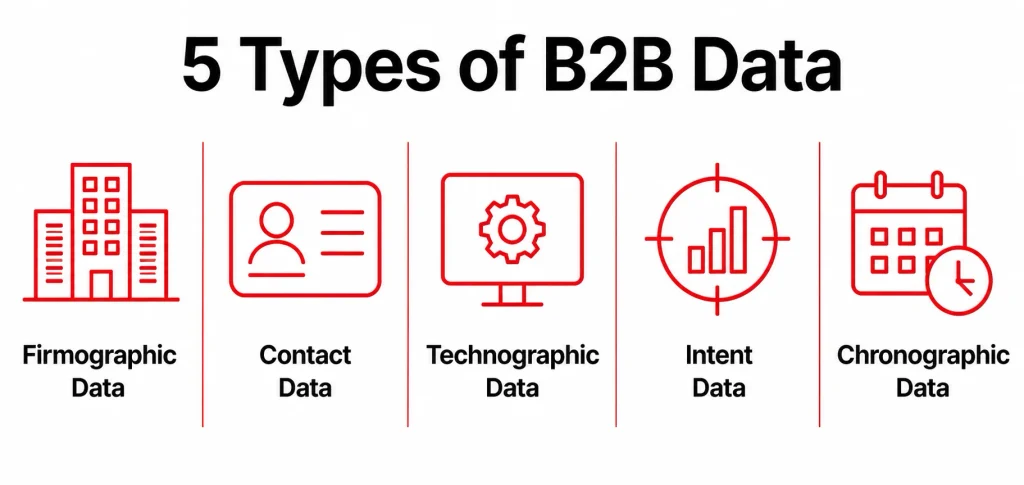
The 5 Types of B2B Data You’ll Actually Use
1. Firmographic Data
Firmographic data describes the company itself: industry, headcount, revenue range, location, and ownership structure. It’s the foundation for market segmentation and for building your ideal customer profile.
Say you sell to mid-market manufacturing companies with 200 to 800 employees. Firmographic data is how you filter a list of 40,000 companies down to the 600 that actually fit.
2. Contact Data
Contact data is the individual layer: names, job titles, direct phone numbers, work emails, and seniority level. This is what lets a rep reach a person instead of a company switchboard.
Contact data also decays the fastest of the five types. People change jobs, titles shift, and email domains die the moment someone gets laid off or promoted.
3. Technographic Data
Technographic data shows which tools and platforms a company already runs. It’s pulled from job postings, website code scans, and public integration listings.
This matters most for competitive displacement. If you sell a CRM add-on and a prospect already runs Salesforce, that’s a green light, and your pitch writes itself.
4. Intent Data
Intent data tracks research behavior: which companies are actively reading about a topic, comparing vendors, or visiting review sites like G2. It signals timing, not just fit.
A company can match your ICP perfectly and still be a year away from buying. Intent data helps you spot who’s actually in-market right now.
5. Chronographic (Event) Data
Chronographic data, also called trigger data, flags specific business events. Think a new funding round, a leadership change, or rapid hiring in one department.
These events create a natural reason to reach out. “Congrats on the Series B” beats a cold, generic opener every time.
Knowing the five types is one thing. Knowing where to actually get them is the next problem GTM teams run into.
Where B2B Data Comes From
B2B data sources split into two buckets: first-party data you collect yourself, and third-party data you buy or license.
First-party data comes from your own systems. Think CRM records, website form fills, product usage logs, and support tickets. It’s usually your most accurate data, because you captured it directly.
Third-party data comes from providers who compile public records, license from other vendors, or run verification networks. Sales intelligence platforms package this into searchable databases with filters for firmographics, contact details, and intent signals.
LinkedIn sits in its own category. It’s technically third-party data, but it’s the fastest-updating source for job titles and company moves.
That makes LinkedIn prospecting worth building into your workflow, even if you already pay for a data platform.
None of this data matters unless you know what to do with it. Here’s where it actually shows up in a GTM motion.
What B2B Data Is Actually Used For
B2B data shows up in nearly every GTM workflow. Four uses matter most:
- Building your ICP. Firmographic and technographic data define which accounts you should target, before a single email goes out.
- Building a prospect list. Contact data turns a target account list into an actual prospect list you can call or email.
- Personalizing outreach. Job title, tech stack, and recent events let you write a first line that isn’t generic.
- Scoring and prioritizing leads. Intent and chronographic data tell you who to call first, not just who fits your criteria on paper.
Most B2B data guides skip this part entirely. None of it holds up if the data itself is falling apart in the background.
Why Most B2B Data Goes Bad (And What It Costs You)
B2B contact data decays fast. HubSpot’s analysis of MarketingSherpa research puts the rate at roughly 2.1% per month, which compounds to about 22.5% a year. Close to a quarter of your contact database goes wrong within 12 months, even if it started clean.
Gartner estimates that poor data quality costs organizations an average of $12.9 million a year. That number covers wasted spend, missed opportunities, and lost productivity.
Most of that damage doesn’t show up as one big failure. It shows up in small ones instead. A bounced email, a wrong extension, a lead score built on a title that changed months ago.
Decay doesn’t hit every data type at the same speed:
| Data Type | Decay Speed | Why |
|---|---|---|
| Contact data | Fastest | People change jobs and titles constantly |
| Intent and chronographic data | Fast | Buying signals and events expire within weeks |
| Technographic data | Moderate | Companies swap tools periodically, not constantly |
| Firmographic data | Slowest | Company size and industry shift less often |
Here’s where a lot of teams make the problem worse instead of better.
Myth: More Data Is Better Data
The myth: a bigger database means more pipeline. The reality: a bloated, unverified list buries your best prospects under thousands of dead contacts.
I’ve seen teams show off a 500,000-contact database while their reps can’t find five good prospects in their own vertical. That’s not a data asset. That’s a graveyard with a search bar.
A tighter list of 2,000 verified contacts that match your ICP will outperform 50,000 unverified ones every time. Your reps spend their time selling instead of guessing which numbers still work.
So how do you avoid ending up with a graveyard instead of a list? Start by knowing what to check before you buy.
How to Evaluate a B2B Data Source
Not every provider deserves your budget. Before you sign a contract, check these five things.
- Refresh cadence. Ask exactly how often records get re-verified, not just when they were first collected. Monthly beats “updated regularly,” which usually means never.
- Source transparency. A provider should tell you exactly where the data comes from: public filings, opt-in forms, or scraped listings. Vague answers mean the devil is in the details, and you won’t like what you find.
- Match rate on your own list. Upload a sample of 200 known-good contacts and see how many the provider verifies correctly. This tells you more than any sales deck.
- Field-level accuracy, not just volume. A provider claiming 95% accuracy usually means format accuracy, not real-world accuracy. Ask what percentage of emails actually deliver.
- Who owns data quality on your side. Even the best provider’s data decays over time. Someone on your team, usually RevOps, needs to own ongoing verification.
One more thing before you buy anything. Not every data source is legal to use the same way everywhere.
Is Buying B2B Data Legal?
Buying and using B2B data is legal in the US, but how you use it is regulated. Business contact information, like a work email or job title, generally isn’t covered by the same privacy rules as personal consumer data.
That said, how you contact people still matters. Cold email and cold calling both have specific compliance rules depending on where your prospect is located.
I’ve covered the specific rules for cold email and cold calling elsewhere on the site. The requirements differ enough that each one deserves its own breakdown.
Conclusion
B2B data is only valuable if you treat it as a living asset, not a one-time purchase. Know your five data types, verify your source before you buy, and put someone in charge of keeping it clean.
Start small if you have to, but get the fundamentals right out of the gate. A verified list of 500 contacts that match your ICP beats an unverified list of 50,000 every time.
Want more GTM breakdowns like this one? Subscribe to the GTMonly newsletter for practitioner-level frameworks delivered straight to your inbox.
Frequently Asked Questions
What is B2B data used for?
B2B data is used to build ideal customer profiles, create prospect lists, personalize outreach, and score leads by buying intent. Sales, marketing, and RevOps teams pull from the same core data types to run targeted campaigns instead of guessing who to contact.
What are the main types of B2B data?
B2B data breaks down into five main types: firmographic, contact, technographic, intent, and chronographic. Each one plays a different role, from company fit (firmographic) to buying signals (intent) to trigger events (chronographic). Most GTM teams combine at least three of these to build a complete targeting picture.
How accurate is B2B data?
Accuracy varies widely by provider and field type. Top providers verify contact data continuously and claim accuracy above 90%, while unmaintained lists decay by roughly 22.5% a year. Always test a sample against your own known contacts before trusting a vendor’s accuracy claim.
What’s the difference between B2B and B2C data?
B2B data targets a specific person within a specific company, layering company fit with individual access and timing. B2C data targets a household or individual consumer directly, without the organizational context that makes B2B targeting more complex.
How often should you update B2B data?
Most B2B databases need verification at least every 90 days. High-velocity teams running active outbound should verify monthly instead. Contact data changes fastest, and stale records damage both deliverability and rep trust in the CRM.