How to Use AI for B2B Lead Generation (The Right Way)
TL;DR
- AI for B2B lead generation only works when you build a real workflow around it. Tools alone do nothing.
- Most teams chase volume and wonder why their pipeline converts at 2%. Signal-based lead gen fixes that.
- You can automate the entire top of funnel with AI agents, chatbots, and email sequences.
- The stack has five layers: prospecting, enrichment, chatbot, sequences, and CRM sync. Each one matters.
- Building this properly takes a weekend. Most teams never do it. That gap is your advantage.
Most B2B teams trying to use AI for lead generation hit the same wall.
They sign up for a shiny new tool, pull a list of 2,000 contacts, and start blasting outreach. Reply rates hover at 2%. The pipeline looks busy. It barely converts. Then they blame the AI.
I have seen this exact pattern play out across GTM teams of every size. The problem is never the AI. It is the approach. Using AI as a spray cannon when you need a scalpel.
AI lead generation for B2B works when you pair it with a real workflow. That means getting your ICP right before you touch any tool, using AI agents to find and enrich the accounts worth reaching, deploying chatbots that qualify buyers while you sleep, and running email sequences that sound like a person actually did their homework.
This guide walks you through all of it. No theory, no filler. Just the workflow, the tools to consider, and what to watch out for along the way.
What Is AI Lead Generation for B2B?
AI lead generation for B2B is the use of artificial intelligence to find, qualify, and engage potential business customers without doing it all manually. Instead of cold lists and hours of research, AI pulls data from multiple sources and surfaces the accounts that match your ICP and are showing real buying intent right now.
The “right now” part is what separates good AI lead gen from a glorified spreadsheet. Most tools find you contacts. The useful ones tell you which of those contacts are worth a call this week.
Volume-Based vs Signal-Based: Know the Difference
There are two schools of thought on AI lead generation. Most teams default to the wrong one, and they do not realize it until they have burned through three months of budget.
Volume-based lead gen is about scale. You build the biggest list you can, match it against basic firmographic filters, and automate outreach at scale. It makes sense at very low deal sizes where the math favors sheer quantity. For most B2B teams selling above $5K ACV, it creates noise and poisons your sender reputation.
Signal-based lead gen is about timing. You identify accounts that are already moving toward a buying decision. A company just closed a Series B. A new VP of Sales was hired three weeks ago. Their LinkedIn job board shows two open SDR roles. Those signals tell you something real is happening over there. Reaching out with that context is completely different from a cold blast.
One team documented this gap publicly. Their volume motion: 2,000 contacts per month, 2% conversion to meeting, 40 meetings total. Their signal-based motion: 300 contacts, 14% conversion, 42 meetings. Same pipeline output. One-sixth the contacts. The signal approach won because every message had a reason behind it.
Signal-based is harder to set up. Worth it every single time.
Why AI Changes the Game for B2B Lead Generation
Skip this if you are already sold. If you are still on the fence about whether AI actually moves the needle, here are four places where it makes a real difference.
1. Speed to Lead Is a Bigger Deal Than Most Teams Admit
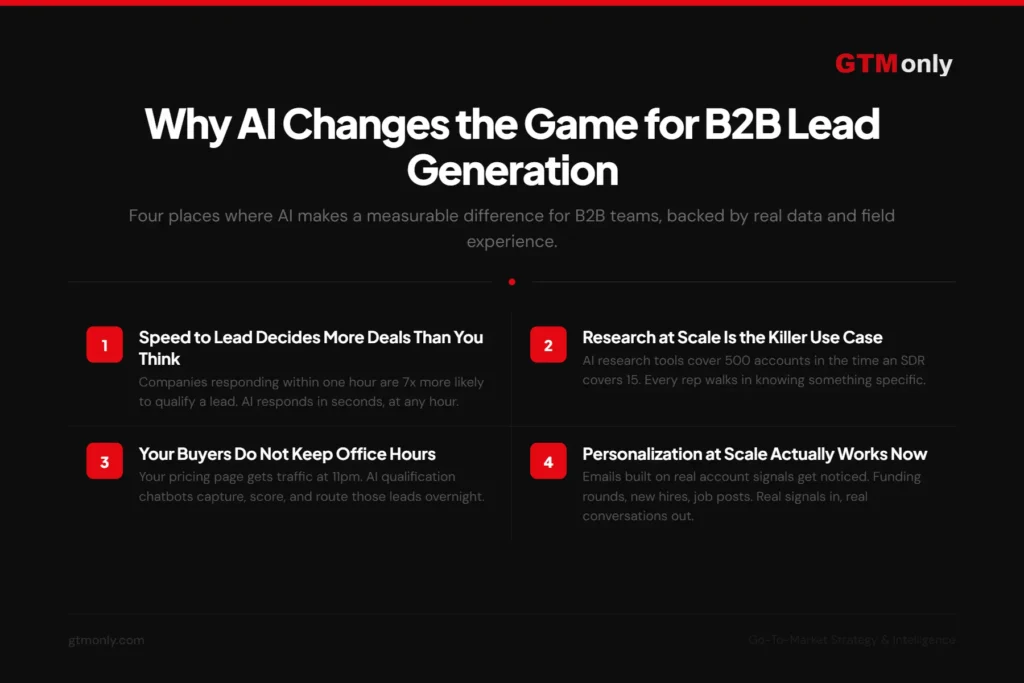
Harvard Business Review studied response times and found that companies responding to an inbound lead within one hour are seven times more likely to qualify that lead than companies waiting just one extra hour. After 24 hours, that likelihood drops by more than 98%.
Most B2B teams I have talked to respond to inbound leads in hours. Some in days. Their B2B sales team is busy, their CRM notifications get buried, and by the time someone follows up the prospect has moved on. AI chatbots respond in seconds, at any hour. That single change can shift your conversion rate before you touch anything else.
2. Research at Scale Is the Killer Use Case
Ask any SDR what eats their day and they will say the same thing: research. Reading company news, checking LinkedIn activity, scanning job boards, looking up tech stacks. It is the most valuable work in prospecting because context wins deals. It is also the slowest.
AI research tools, like Clay’s Claygent or similar enrichment agents, do that work for 500 accounts in the time it takes a human to cover 15. They pull funding rounds, leadership changes, competitor signals, hiring trends, and recent company news automatically. Your rep walks into a discovery call knowing something specific and relevant about that account. That context is what turns a cold outreach into a warm conversation.
3. Your Buyers Do Not Keep Office Hours
Here is something obvious that most teams still ignore. Your team goes offline at 6pm. Your pricing page gets traffic at 11pm. Static forms let those visitors leave. AI chatbots start a conversation.
A well-configured qualification chatbot asks the right questions, filters out the tire-kickers, and routes high-intent visitors directly into your CRM with full context attached. By the time your team arrives the next morning, those leads are already scored, enriched, and waiting in a prioritized queue. No rep had to lift a finger overnight.
4. Personalization at Scale Actually Works Now
I want to be honest about something. Most AI-written emails are terrible. You can spot them in under three seconds. Name, company, generic pain point, weak CTA. Delete.
The ones that work are built differently. They pull from real account signals before generating a word of copy. A message referencing a recent funding round, a new hire in a relevant role, or a job listing that signals a specific initiative gets noticed. The quality of your AI output is a direct reflection of the quality of your enrichment data. Garbage in, garbage out. Real signals in, real conversations out.
How to Automate B2B Lead Generation with AI
Most guides on this topic give you a list of tactics. I am giving you a workflow you can actually build. Follow these five steps in order. Each one depends on the previous one working correctly.
1. Define Your ICP Before You Touch Any Tool
I have watched teams skip this step more times than I can count. They buy the tool, load up the database, and start filtering. Then they wonder why their lead quality is mediocre.
AI amplifies whatever you feed it. A fuzzy ideal customer profile produces a fuzzy lead list at 10x volume. Before you open any prospecting platform, do this: pull your last 20 closed-won deals and look for patterns. Company size, industry, revenue range, tech stack, hiring velocity, and the exact job title of the person who said yes. That data tells you who your real ICP is. Not who you think it is. Who actually buys.
Write it down with no more than four firmographic filters. If your ICP needs six filters to describe, it is a wishlist. Ruthless definition is the foundation this whole system runs on.
2. Use AI to Find and Enrich Your Leads
Now you need a prospecting tool that does two things well: finds contacts matching your ICP and enriches each profile with signals that tell you why to reach out now, not just that they exist.
Tools like Apollo.io are a solid starting point for most teams. You set your ICP filters, pull a list of 300 to 500 contacts, and export it clean. Resist the temptation to build a list of 5,000. A tight list of 300 well-matched accounts outperforms a bloated list of 5,000 every single time. Your reply rates prove it.
For more advanced signal-based workflows, tools like Clay give you a data orchestration layer on top of multiple providers. You connect it to Apollo, LinkedIn, Crunchbase, and other sources, then build enrichment workflows that pull funding history, leadership changes, tech stack data, and recent news automatically. It has a learning curve. Once you get past it, your outreach context goes to a different level entirely.
Whatever tool you pick, your output is the same thing: a clean, enriched list of contacts that match your ICP and are showing buying signals. That list is the foundation for everything that follows.
3. Deploy an AI Chatbot for 24/7 Qualification
Outbound covers the accounts you go after. Chatbots cover the accounts coming to you. Both matter.
Put a chatbot on your three highest-intent pages: pricing, demo request, and any comparison or alternatives page. The chatbot runs through your ICP qualifying questions. Company size, use case, current tooling, timeline to decision. It scores answers automatically. High-scoring visitors get routed to a booking link or a real-time rep alert. Low-scoring visitors enter a nurture sequence.
Platforms like Intercom’s Fin or similar AI chatbot tools connect natively to most major CRMs and can be live on your site in an afternoon without any engineering involvement. Businesses using AI chatbots for qualification report 20 to 30 percent higher conversion rates compared to static forms, primarily because the conversation happens while intent is still hot.
4. Set Up Automated Email Sequences
The 4-email B2B sequence that actually gets replies looks like this:
- Email 1, Day 1: A short opener that references a real signal from the account. One sentence on the problem. One genuine question. Under 80 words total.
- Email 2, Day 3: A brief case study or a specific stat relevant to their industry. No pitch. Just something useful they can take away whether they buy from you or not.
- Email 3, Day 6: A direct ask. Can you spare five minutes this week? Yes or no.
- Email 4, Day 12: A breakup email. Short. Honest. No guilt-trip. This one consistently gets the highest reply rate of the four, often from people who ignored the first three.
Email sequencing platforms like Instantly, Apollo Sequences, or whatever your CRM ships natively can generate the first draft of each email from your enrichment data. Your rep reads it, adjusts the tone if needed, and approves. Speed without losing the voice.
Do not skip that review step. AI drafts miss context a rep would catch immediately. A message goes out referencing a company initiative that ended six months ago and you have burned that relationship. Human eyes on the first send in every sequence. That is not optional.
5. Sync Everything to Your CRM with a Workflow Automation Platform
This is where most setups quietly fall apart. Your prospecting data lives in one tool. Enrichment data in another. Chatbot leads in a spreadsheet nobody updates. Email replies sitting in someone’s inbox. Nobody has the full picture, so nobody acts with full context.
A workflow automation platform, Zapier being the most accessible option for most teams with alternatives like Make.com if you want more control, connects every tool in your stack and pushes everything into one CRM record automatically. You configure the logic once. Every lead that enters the system from that point forward follows the same path.
Here is the blueprint:
| AI Lead Gen Automation Workflow 1) Trigger: New lead added to prospecting tool list or new contact qualifies against ICP filters 2) Action 1: Create or update the contact record in your CRM (HubSpot, Salesforce, or your preference) 3) Action 2: Trigger enrichment to fill missing fields: company info, job title, LinkedIn URL, recent news 4) Action 3: AI scores the lead against your ICP and tags as Hot, Warm, or Cold 5) Action 4: Hot leads trigger an instant notification to the assigned rep with full context attached 6) Action 5: Warm leads enter the automated 4-email sequence described above 7) Action 6: Cold leads enter a long-term nurture track for future re-engagement |
Set it up once. From that point, every new lead goes through the same path automatically. Your team starts each day with a prioritized list of who to call, every profile already enriched, scored, and sitting in the CRM.
How to Build an AI Agent for B2B Lead Generation
An automation workflow follows rules you write. An AI agent makes decisions. That difference is worth understanding before you build one.
Think of a lead gen agent as a member of your team who works overnight shifts. They scan sources, research companies, score accounts, and drop fully briefed leads into your CRM before you arrive in the morning. No-code platforms like Zapier Agents, Make.com, or n8n let you build one without touching a line of code.
1. What a Lead Gen AI Agent Actually Does
Picture this. A prospect posts on LinkedIn: “We are evaluating CRM options for our 80-person sales team.” Your agent sees that post, identifies the company and the poster’s title, cross-references your ICP criteria, confirms it is a match, and drops a fully enriched contact record into your CRM with a drafted connection request already written. All of this happens automatically while you are asleep.
That is not a hypothetical. That is a Zapier Agent running on a $49/month plan. The capability is there. Most teams just have not built it yet.
2. Step-by-Step: Build Your First Lead Gen Agent
No-code agent platforms work in plain language. You write instructions, connect your apps, set guardrails. Here is the process from start to working agent:
- Write your agent instructions in plain English. Be specific. Bad example: ‘Find leads on LinkedIn.’ Good example: ‘Monitor LinkedIn for posts containing the phrases looking for sales tools or evaluating our CRM. When you find one, identify the company name and the poster’s job title. Check if the company has 50 to 500 employees and is in B2B SaaS. If it matches, create a contact in HubSpot and draft a personalized connection request referencing what they posted.’
- Connect your apps. Link the agent to LinkedIn, your CRM, and your email platform using the platform’s built-in app connections. Authentication is handled for you.
- Point the agent at your ICP data. Store your ICP criteria in a spreadsheet, Airtable table, or the platform’s native database. The agent reads this to score incoming leads against your actual criteria.
- Add a human approval step before any email or message sends. The agent drafts it and pings you for a one-click approve or skip. This keeps your brand voice consistent and stops anything embarrassing from going out.
- Test on 10 leads before you open the tap. Watch every step. Adjust the instructions wherever the agent gets it wrong. Nail it on 10. Then let it run on hundreds.
Once it is dialled in, the agent runs every day without you. It handles the research, the scoring, and the first draft. Your team handles the conversations. That division of labour is exactly how a lean GTM team punches above its weight.
The Full AI Lead Generation Stack for B2B Teams
Let me map out the five tool categories you need. I am listing the most commonly used options in each category so you have reference points, not because any one of them is the definitive right answer. Your choice depends on your budget, team size, and existing tech.
1. The Five Tool Categories
- AI prospecting and enrichment (e.g. Apollo, Clay, ZoomInfo, Cognism): This is where you build your ICP-matched lead list and enrich each profile with signals. Apollo is the most accessible starting point. Clay is more powerful once you have the ops bandwidth to configure it.
- AI chatbot for inbound qualification (e.g. Intercom Fin, Drift, HubSpot chatbot): Lives on your high-intent pages and qualifies visitors 24/7. Look for options that integrate directly with your CRM so leads sync automatically.
- Email outreach and sequences (e.g. Instantly, Apollo Sequences, Lemlist, HubSpot Sales Hub): Manages your outbound email cadences with AI-assisted personalization. Most have solid deliverability features baked in now.
- Workflow automation and CRM sync (e.g. Zapier, Make.com, n8n): The connective tissue. Triggers actions across your stack when a lead is created, enriched, scored, or changes status. Zapier is the easiest to start with. Make.com gives you more control at a similar price.
- CRM (e.g. HubSpot, Salesforce, Pipedrive): Your system of record. Everything flows into and out of here. HubSpot’s free tier is more than enough to start. Salesforce makes sense once you have a larger sales team and need more customization.
What Does This Actually Cost?
Real talk: most people publishing articles on this topic never give you a straight answer on cost. Here is what a lean B2B team actually spends.
At the entry level, you can get a functional stack running for $200 to $400 per month. That typically covers a prospecting tool on a starter plan, a workflow automation platform, an email sequence tool, and CRM on a free or low-cost tier. As you scale contact volume, those numbers go up but not proportionally.
For context, that is less than two days of a junior SDR’s fully loaded salary per month. Most teams running this comparison decide pretty quickly which direction makes more sense for their growth stage.
Mistakes That Will Kill Your AI Lead Gen Setup
Every guide on this topic tells you what to do. Very few tell you what will quietly wreck the whole thing. I have watched these mistakes kill otherwise solid setups. Learn them now.
1. Skipping the ICP Work
Boring, I know. Everyone nods when you talk about ICP and then skips the actual work. The result is a very efficient machine generating a high volume of the wrong leads.
Pull the closed-won data first. Two hours of analysis upfront saves you months of tuning a system built on the wrong inputs. No tool solves a bad ICP. They make it worse at scale.
2. Sending AI Emails Without Human Review
Full AI automation on outbound is a brand risk hiding behind the word efficiency.
The emails sound fine until they do not. A message goes out referencing a company initiative that ended six months ago. The tone drifts from your brand in a way you would have caught instantly. One wrong message to the right account can kill a relationship you spent weeks building. Keep a human in the loop on every first email in a sequence. That is the minimum viable guardrail.
3. Measuring the Wrong Things
Volume metrics lie to you. Total contacts added, emails sent, open rates. They feel like progress. They tell you almost nothing about whether your AI lead gen system is actually working.
The metrics that matter are qualified meeting rate, pipeline generated per 100 contacts, and conversion rate at each funnel stage. If your system cannot report those three numbers clearly, you are flying blind. Fix the measurement before you scale anything.
4. Tool Sprawl
I have seen this kill more setups than anything else. Teams pile on tools because each one promises to solve a specific problem. Before long you have six platforms, data living in five different places, and no single unified view of a lead.
Start with three: one prospecting tool, one automation platform, one CRM. That is a complete system. Add a tool only when you have hit a specific, documented limit that it solves. Not before. The simpler your stack, the more reliable your data, and the faster your team can actually use it.
How to Measure AI Lead Generation Performance
Your system is live. Now you need to know if it is actually working. Most teams track the wrong numbers and declare AI lead gen a failure when the real problem is the measurement. Track these five instead.
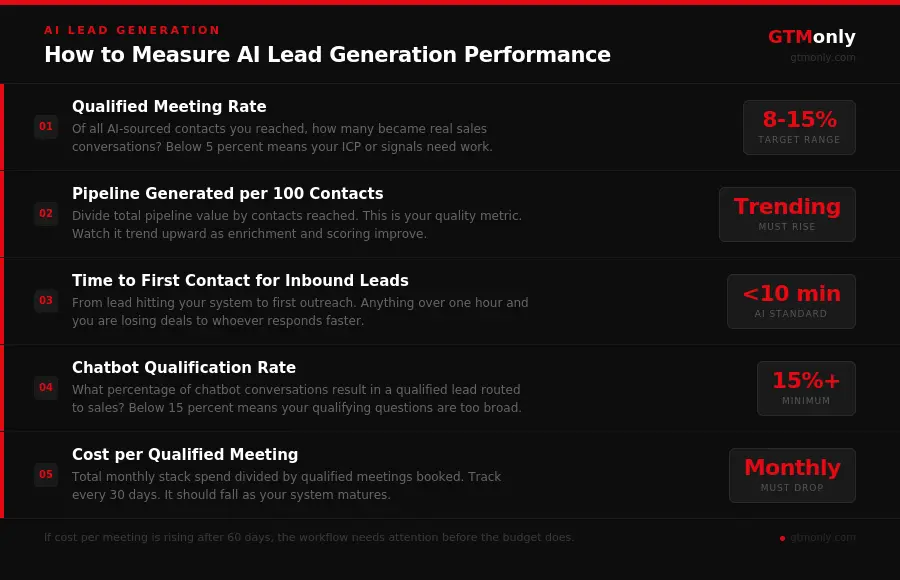
- Qualified meeting rate: Of all the AI-sourced contacts you reached out to, how many became real sales conversations? A well-tuned signal-based motion should land between 8 and 15 percent. Below 5 percent means your ICP or your signals need work.
- Pipeline generated per 100 contacts: Divide total pipeline value by the number of contacts you contacted. This is your quality metric. Watch it trend upward as your enrichment and scoring improve.
- Time to first contact for inbound leads: How long from a lead hitting your system to your first outreach? AI should get this under 10 minutes for inbound. Anything over an hour and you are losing deals to whoever responds faster.
- Chatbot qualification rate: What percentage of chatbot conversations result in a qualified lead routed to sales? Below 15 percent usually means your qualifying questions are too broad or your ICP definition is fuzzy.
- Cost per qualified meeting: Total monthly stack spend divided by qualified meetings booked that month. Track this every 30 days. It should come down as your system matures. If it is going up, something in the workflow needs attention.
Conclusion
AI lead generation for B2B is not a tool purchase. It is a system you build and tune over time.
The GTM teams consistently filling pipeline right now are not using more tools than everyone else. They picked fewer, connected them properly, and spent the time upfront to define a tight ICP. That foundation is what makes the AI actually useful instead of just expensive.
You have the whole blueprint. Start with your ICP this week. Build your first enriched list of 300 accounts. Set up the workflow automation so leads flow into your CRM without anyone touching a keyboard. Deploy the chatbot on your pricing page before your next campaign goes live. Then measure qualified meeting rate, not email volume, and adjust from there.
Most teams read something like this and do nothing with it. The ones that build it get a genuine edge. Start from scratch this weekend. Thirty days from now your lead generation looks completely different.
Frequently Asked Questions
What is AI lead generation for B2B?
AI lead generation for B2B is the use of artificial intelligence to find, qualify, and engage potential business customers automatically. AI tools analyze firmographic data, buying signals, and behavioral patterns to identify which accounts are most likely to convert right now. It replaces manual list building and generic outreach with targeted, signal-driven prospecting that runs largely without manual input.
How do I automate lead generation with AI?
Start by defining your ICP from your closed-won deal data. Use a prospecting tool like Apollo or Clay to build an enriched list of matching contacts. Deploy an AI chatbot on your high-intent pages for around-the-clock qualification. Set up automated email sequences with AI-drafted messages that your team reviews before sending. Connect everything through a workflow automation platform like Zapier or Make so every lead is created, scored, and routed in your CRM without anyone doing it manually.
What is an AI agent for lead generation?
An AI lead generation agent is an autonomous system that handles prospecting tasks without waiting for human input. You write plain-language instructions, connect your apps, and the agent monitors sources like LinkedIn for buying signals, researches matching companies, scores them against your ICP, drafts personalized outreach, and adds contacts to your CRM automatically. The difference from a regular automation is that an agent makes decisions rather than following a fixed script.
What is the difference between AI lead generation and traditional lead generation?
Traditional lead generation runs on static lists, manual research, and rule-based scoring. AI lead generation uses machine learning to detect buying signals in real time, scores leads based on actual behavior rather than static criteria, and personalizes outreach at scale without requiring a rep to do the research manually. In practice, AI lead gen produces higher qualified meeting rates with smaller contact lists and significantly less manual work.
How long does it take to set up an AI lead generation system?
A basic system can be running in a weekend. ICP definition takes two hours if you have access to your CRM data. Building a first prospecting list takes under an hour. Configuring the workflow automation takes two to three hours. Getting a chatbot live on your pricing page takes an afternoon. The signal-based enrichment layer takes one to two weeks to tune because you need real-world data to calibrate your scoring model properly.