Buying Group Software: 8 Platforms to Identify and Map Buying Group Members
TL;DR
- The best buying group software for most B2B teams is Demandbase, 6sense, or LeanData. Each one solves a different part of the problem.
- What it does: It finds the people involved in a purchase and gives each one a role. It also flags missing roles, like the economic buyer.
- How tools find members: They use five methods. These are CRM deal patterns, title matching, persona intent, calendar capture, and org charts.
- Best for budget teams: LinkedIn Sales Navigator Advanced costs $159.99 per month. Its Relationship Map shows gaps in the buying committee.
- Best for keeping maps current: UserGems adds members your CRM missed, including people from past meetings. It also tracks job changes.
- How to choose: Start with where your deal data lives. Then decide if you need to find people, organize them, or both. Every big platform here is quote-only.
Buying group software helps B2B teams find every person involved in a purchase, assign them a role, and spot who’s still missing.
Your CRM shows the two people who filled out forms. Everyone else on the committee is researching quietly, and you have no idea who they are.
Forrester’s buyer research puts the average B2B buying decision at 13 people, with 89% of purchases spanning two or more departments. You can track that many people by hand on one deal. Try it across forty deals and the spreadsheet wins.
Good platforms to identify buying group members do that legwork for you. The catch is that each one finds people in a different way.
I compared eight of them on method, contact data, pricing, and user ratings from G2, checked in October. The Mapping Depth stars are my own call on how far each tool goes in finding and mapping members.
Buying Group Software Comparison Table
| Tool | Best for | How it finds members | Own contact data | Starting price | G2 rating |
|---|---|---|---|---|---|
| Demandbase One | AI-generated buying groups | CRM deal patterns plus title matching | Yes | Custom quote | 4.4 (2,010 reviews) |
| 6sense | Anonymous buyer detection | Predictive models plus intent | Yes | Custom quote | 4.2 (1,567 reviews) |
| LeanData Journeys | Salesforce orchestration | Engagement, titles, and deal context | No | Custom quote, add-on | 4.6 (1,065 reviews) |
| UserGems | Filling CRM gaps | Closed-won patterns plus calendar capture | Yes | Custom quote | 4.7 (167 reviews) |
| Adobe Journey Optimizer B2B Edition | Adobe and Marketo stacks | AI role recommendations from first-party data | No | Custom quote | Not enough reviews |
| LinkedIn Sales Navigator | Reps and small teams | Org charts from LinkedIn profiles | Profiles only | $159.99 per month (Advanced) | 4.4 (2,211 reviews) |
| Intentsify | Persona-level intent | Intent by persona and research stage | Add-on | Custom quote | 4.4 (33 reviews) |
| Bombora | Intent data feeding other tools | Intent by job function and seniority | No | Custom quote | 4.4 (157 reviews) |
What Is Buying Group Software?
Buying group software is a platform that finds the members of a B2B buying group and gives each person a role. It tracks how engaged the group is and shows which roles are still missing.
It differs from classic account-based marketing tools in one important way. ABM software tells you which companies to target, while buying group software tells you which people inside them are deciding.
Vendors also call this category buying committee software, buying group platforms, or buying committee mapping tools. Same job, different label.
How Buying Group Tools Identify Members
Every platform on this list uses one or more of five methods. The method matters more than any feature list, because it decides what the tool can see.
1. CRM Deal Pattern Analysis
This approach studies your won and lost deals to see which job titles keep showing up. It turns that pattern into a template and suggests similar people at open accounts.
It mirrors how your team sells today. The downside is obvious: messy contact roles in your CRM produce messy templates.
2. Title Matching Against Contact Data
Some platforms group similar job titles into personas, then search their own contact database for matches at your target accounts. That’s how they surface people you’ve never spoken to.
3. Persona-Level Intent Data
Instead of showing that an account is researching a topic, these tools show which functions and seniority levels are doing the research. A spike from IT and finance at one account suggests a group is forming.
That makes persona intent one of the stronger buying signals you can get. It rarely names specific people, though.
4. Calendar and Email Capture
Calendar capture reads meeting invites and email threads, then logs those people under the right account and deal. It catches the VP who joined one call and never filled out a form.
5. Relationship and Org-Chart Mapping
Org-chart tools draw the account’s structure and highlight empty seats in the committee. Reps doing hands-on research love them, but they show job titles rather than buying behavior.
8 Best Platforms to Identify Buying Group Members
I ranked these by how directly each one does the core job: finding and mapping the people in a deal.
1. Demandbase One: Best for AI-Generated Buying Groups
Best for: Mid-size and large teams that want buying groups built from their own past deals.
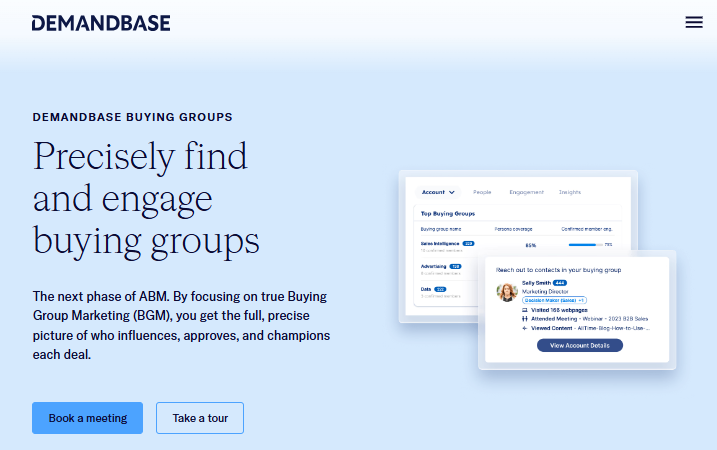
Demandbase puts buying groups at the center of its platform. Its AI studies your past deals to define personas, then fills them with real people.
How Demandbase Finds Members: An AI model groups similar job titles into personas using your deal and activity data. It links each persona to its 25 closest job titles, then combines personas into a buying group.
Demandbase Contact Data: Demandbase pairs your CRM contacts with its own B2B contact data. That lets it suggest new members who aren’t in your CRM yet.
Demandbase Mapping Depth: ★★★★★
Other Notable Demandbase Features:
- A buying group dashboard that builds and tracks groups and personas automatically
- Engagement tracking that shows where you have only one contact
- CSV upload of deal and activity data if your CRM isn’t connected
| ✔ Strengths | ❌ Watch-Outs |
|---|---|
| Buying groups built from your own closed deals | Persona quality depends on CRM hygiene |
| Finds members outside your CRM | Full platform is a large commitment |
| Shared view for sales and marketing | No public pricing |
Demandbase Pricing: Its pricing page describes a platform fee plus a flat fee per user, with no dollar amounts. You also can’t buy the sales or marketing side on its own.
What Demandbase Users Say: Across 2,010 G2 reviews, Demandbase One averages 4.4 out of 5. Site visit intelligence and a responsive support team come up again and again.
Demandbase Verdict: If buying groups are the main reason you’re shopping, Demandbase is the most complete option here. Clean up your CRM contact roles first, or the AI will learn from bad habits.
2. 6sense: Best for Spotting Anonymous Buyers
Best for: Enterprise teams that want to find buying groups before anyone fills out a form.
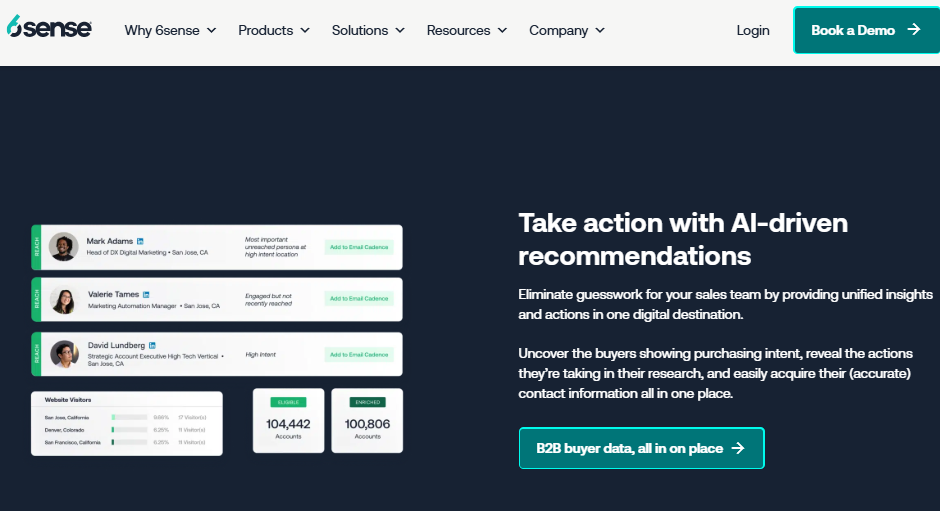
6sense focuses on the research buyers do before they contact you. It predicts which accounts are in-market and which personas inside them are active.
How 6sense Finds Members: 6sense uses intent, site visits, CRM data, and AI to score accounts and the people in them. Its Persona Map shows an account’s buying team visually, including contact details, activities, and unknown members.
6sense Contact Data: 6sense has its own contact data. Reps can add missing members straight from the Persona Map.
6sense Mapping Depth: ★★★★☆
Other Notable 6sense Features:
- Predicted buying stage for each account
- AI recommendations on which contacts to acquire or engage next
- Audience syncs to advertising, email, and sales tools
| ✔ Strengths | ❌ Watch-Outs |
|---|---|
| Detects activity before buyers raise their hands | G2 users report a three-month implementation |
| Visual Persona Map of each buying team | Setup is complex for new users |
| Strong predictive scoring | Some reviewers question data accuracy |
6sense Pricing: Paid packages mix Sales Intelligence, data credits, and Predictive AI, and none show a price. G2 reviewers rate its cost at the top of the scale and report a 12% average discount.
What 6sense Users Say: It sits at 4.2 out of 5 from 1,567 G2 reviews, the lowest score here. People love the new pipeline it uncovers and grumble about setup and the interface.
6sense Verdict: 6sense shines when your buyers research quietly for months before talking to sales. Budget for a long rollout and a dedicated admin.
3. LeanData Journeys: Best for Salesforce-Native Orchestration
Best for: RevOps teams on Salesforce that need buying groups attached to real opportunities.
LeanData started in lead routing, and its buying group product builds on that. It turns scattered contacts into organized groups inside Salesforce.
How LeanData Finds Members: AI assigns roles using engagement, job titles, and deal context. Groups update on their own based on rules for product, team, or region.
LeanData Contact Data: LeanData works with the data already in Salesforce and your other tools. It doesn’t sell its own contacts.
LeanData Mapping Depth: ★★★★☆
Other Notable LeanData Features:
- Buying group members convert to Salesforce Contact Roles in one step
- Alerts when the group changes or a key person goes quiet
- Buying Groups Blueprint, which analyzes 24 months of closed deals to find role patterns
| ✔ Strengths | ❌ Watch-Outs |
|---|---|
| Built directly on the Salesforce opportunity | Salesforce-centric by design |
| Flags missing roles like champion or economic buyer | Needs a data source to find net-new people |
| Strong reputation for support | Journeys requires the Premium plan |
LeanData Pricing: Journeys is an add-on to LeanData’s top Premium plan. Price depends on features and Salesforce users. Setup is billed on top.
What LeanData Users Say: 4.6 out of 5 from 1,065 G2 reviews. Admins rave about the routing and support. The complaints are about configuring complex workflows.
LeanData Verdict: Pick LeanData when your contacts are a mess inside Salesforce. It organizes people well but won’t find new ones, so pair it with a data source.
4. UserGems: Best for Capturing Members Your CRM Missed
Best for: Sales teams whose CRM contact records lag behind real deal activity.
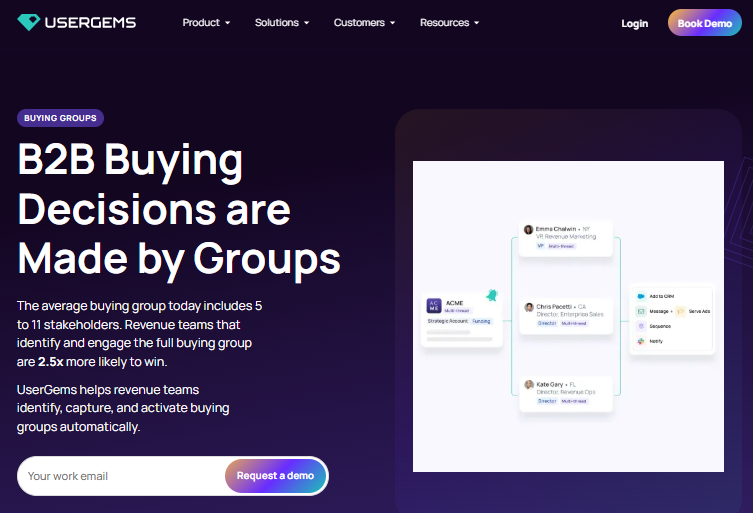
UserGems fills the gap between who’s in your CRM and who’s involved in your deals. It’s especially strong at keeping buying groups current as people change jobs.
How UserGems Finds Members: UserGems studies your open and won deals to learn who shapes revenue. It then finds matching contacts and adds them to your CRM with roles and signals.
UserGems Contact Data: UserGems uses its own verified contact data. It also creates contacts from Google and Outlook calendars, including past meetings your CRM never logged.
UserGems Mapping Depth: ★★★★☆
Other Notable UserGems Features:
- Job change and website visit signals at the contact level
- Workflows that add new members to sequences and ad audiences
- Links new contacts to the right deal in Salesforce
| ✔ Strengths | ❌ Watch-Outs |
|---|---|
| Recovers stakeholders from past meetings | Strongest with Salesforce |
| Tracks job changes across the group | Less focus on anonymous intent |
| Fast setup compared to larger platforms | No public pricing |
UserGems Pricing: Demo first, quote after. G2 shows no public price for it either.
What UserGems Users Say: It has the best score on this list, 4.7 out of 5 from 167 G2 reviews. Reviewers say it takes about a month to get running.
UserGems Verdict: Great for teams with plenty of demand and a CRM that can’t keep up. It’s also far lighter to roll out than a full ABM platform.
5. Adobe Journey Optimizer B2B Edition: Best for Adobe and Marketo Stacks
Best for: Large marketing teams that already run Marketo Engage and other Adobe tools.
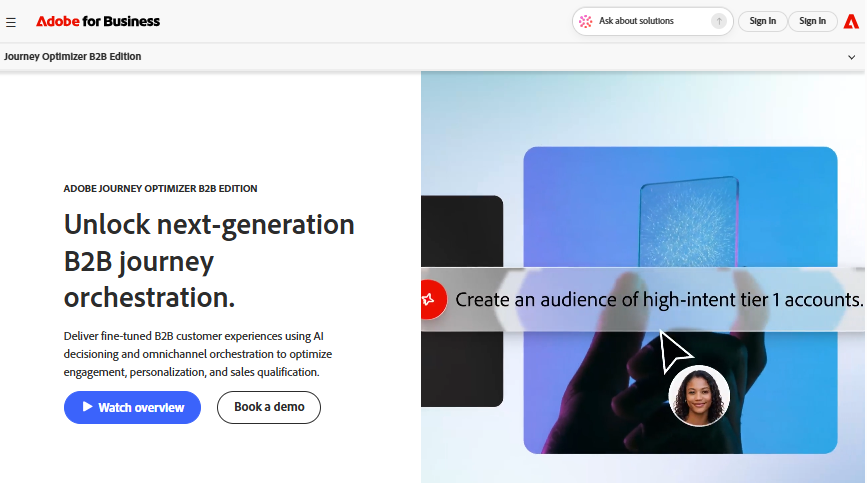
Adobe built this product around buying groups from day one. It’s a marketing journey tool first, with member discovery built into its audiences.
How Adobe Finds Members: An AI agent reads your CRM profiles, marketing activity, and web content, then suggests personas and roles. You fill each role with AI picks or by hand.
Adobe Contact Data: Adobe works from your own data and Marketo Engage records. It doesn’t sell outside contact data.
Adobe Mapping Depth: ★★★★☆
Other Notable Adobe Features:
- Coverage scoring based on which roles are already filled
- Missing member lists you can send to paid media campaigns
- Reusable role templates for similar products
| ✔ Strengths | ❌ Watch-Outs |
|---|---|
| Buying groups built into journey design | Best value only inside the Adobe stack |
| Clear coverage and completeness scores | No external contact data |
| Marketing qualified buying groups for sales handoff | Few public user reviews so far |
Adobe Pricing: Sales-led, with no public price. In practice it gets bundled into your wider Adobe contract.
What Adobe Users Say: G2 has too few reviews to show a rating yet. Ask Marketo users in your network how it’s going before you sign.
Adobe Verdict: If your team lives in Marketo, this is the most natural way to add buying groups. Outside Adobe, the other picks here are easier to justify.
6. LinkedIn Sales Navigator: Best for Reps and Small Teams
Best for: Solo reps and small sales teams who want to see the buying committee without a big contract.
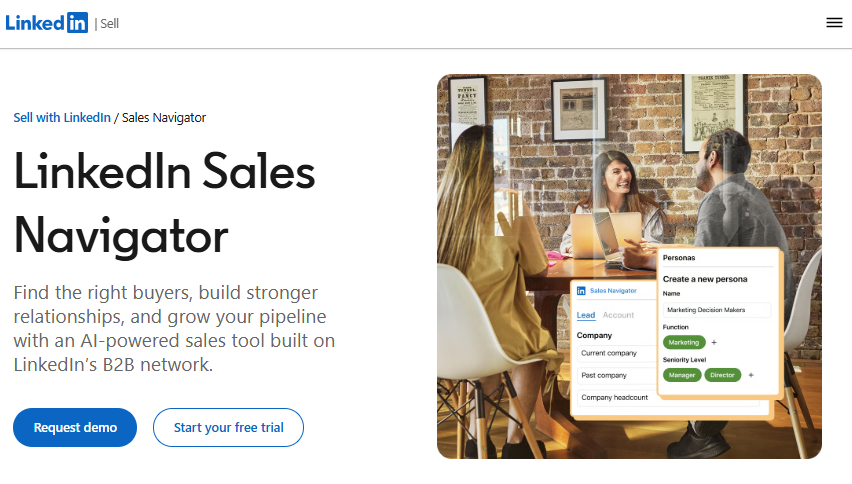
Sales Navigator isn’t a true buying group platform. Still, its Relationship Map gives reps a usable org chart of each account at a public monthly price.
How Sales Navigator Finds Members: The Relationship Map builds a live org chart for each account. It shows gaps in the buying committee and alerts you on key leads. Relationship Explorer then suggests warm paths in.
Sales Navigator Contact Data: Sales Navigator draws on LinkedIn member profiles. It doesn’t provide verified emails or phone numbers on its own.
Sales Navigator Mapping Depth: ★★★☆☆
Other Notable Sales Navigator Features:
- 50+ search filters, including job function and level
- Buyer intent signals showing interest in your company
- CRM sync on the Advanced Plus plan
| ✔ Strengths | ❌ Watch-Outs |
|---|---|
| Published, affordable pricing | Mapping is manual, not automated |
| Free trial available | Profile data only, no verified contact info |
| Familiar to most sales reps | CRM integration requires Advanced Plus |
Sales Navigator Pricing: Relationship Map is available on Advanced and Advanced Plus. Advanced costs $159.99 per month or $1,799.88 per year per license, and Advanced Plus uses custom pricing.
What Sales Navigator Users Say: With 2,211 G2 reviews and a 4.4 out of 5 average, it’s the most reviewed tool here.
Sales Navigator Verdict: It sits closer to sales intelligence tools than to dedicated buying group platforms. For a small team, it’s the cheapest honest start.
7. Intentsify: Best for Persona-Level Intent
Best for: Demand generation teams that want to know which personas at an account are researching, and how far along they are.
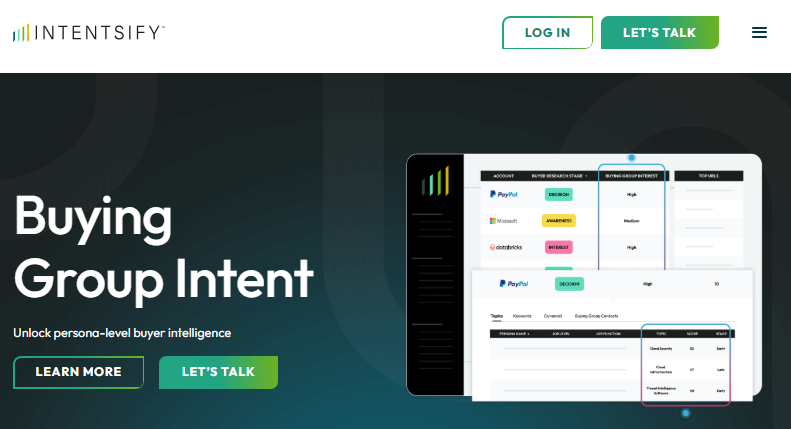
Intentsify’s Buying Group Intent product goes one layer below account intent. It shows how each type of decision-maker engages with your topics.
How Intentsify Finds Members: Intentsify tracks research by persona and shows how far along each one is. It also surfaces hidden personas you might have missed. It rolls these signals into a high, medium, or low buying group interest score.
Intentsify Contact Data: You can buy contacts as an add-on. That turns persona signals into named people.
Intentsify Mapping Depth: ★★★☆☆
Other Notable Intentsify Features:
- Topic scores for each persona at an account
- Aggregation of intent from multiple sources
- Ad and media programs run on the same signals
| ✔ Strengths | ❌ Watch-Outs |
|---|---|
| Shows research stage by persona | Signals point to personas, not always people |
| Combines several intent sources | Reviewers say much runs through a rep |
| Contacts available as an add-on | Small G2 review base |
Intentsify Pricing: Quote-based. G2 lists no entry price, so plan on a sales call.
What Intentsify Users Say: Only 33 G2 reviews so far, averaging 4.4 out of 5. Users like the blended intent sources but dislike routing requests through a rep.
Intentsify Verdict: Treat it as an early-warning system for marketing. You’ll still need a CRM-side tool to put names to the personas.
8. Bombora: Best for Intent Data That Feeds Other Tools
Best for: Teams that want persona-level research signals inside the platforms they already use.
Bombora is one of the best-known names in intent data. Its Company Surge data now connects research activity to buying group personas.
How Bombora Finds Members: Company Surge shows which teams and job levels at an account are researching your topics. That helps you spot hidden members, like finance or security.
Bombora Contact Data: Bombora provides intent data rather than contact records. You’ll need another source for names and contact details.
Bombora Mapping Depth: ★★★☆☆
Other Notable Bombora Features:
- Research signals by department and seniority
- Topic-level surge scores for each account
- Data used for personalizing messages by persona
| ✔ Strengths | ❌ Watch-Outs |
|---|---|
| Widely used intent data | No contact data included |
| Persona signals by function and seniority | Identifies roles, not individuals |
| Works as a layer in other tools | Needs a separate activation tool |
Bombora Pricing: No public price list here either. You’ll get numbers after a sales conversation.
What Bombora Users Say: 4.4 out of 5 from 157 G2 reviews.
Bombora Verdict: Bombora earns its place as a data layer inside tools you already own. If intent is your main need, compare the wider field of intent data providers first.
Best Software to Identify Buying Group Members in Enterprise Deals
Enterprise deals are where these tools earn their price. Committees are bigger, procurement and security join early, and one account can run several purchases at once.
For enterprise teams, I’d shortlist by situation:
- Marketing-led ABM program: Demandbase One or 6sense. Both find members you don’t know yet and score how engaged each group is.
- Salesforce-heavy RevOps team: LeanData Journeys, paired with a contact data source. It keeps every member tied to the right opportunity.
- Adobe and Marketo stack: Journey Optimizer B2B Edition, since your data already lives there.
- Sales team losing track of stakeholders: UserGems. It pulls in people from meetings and flags job changes before a deal goes quiet.
Mid-size teams can start smaller. Sales Navigator Advanced plus a shared mapping sheet covers a lot of ground for under $2,000 per rep per year.
How to Choose Buying Group Software
1. Where Does Your Deal Data Live?
Start with your CRM. LeanData and UserGems lean heavily on Salesforce, while Adobe fits teams built on Marketo Engage.
2. Do You Need Identification, Orchestration, or Both?
Some tools find people. Others organize them around deals and trigger next steps. Demandbase and 6sense do both, while full campaign needs may point you to broader ABM platforms.
3. Where Does the Contact Data Come From?
A tool without its own contact data can map roles but can’t fill empty seats. Check whether you’ll need a second vendor for names, emails, and phone numbers.
4. How Does It Assign Roles?
Ask the vendor to show role assignment on one of your real deals. Title matching alone often mislabels influencers and misses blockers.
5. What Happens After a Member Is Found?
Finding a CFO is useless if nobody acts on it. Look for CRM sync, sequence enrollment, ad audiences, and alerts when the group changes.
Can You Identify Buying Group Members Without Software?
Yes, and for small teams it’s often the right start. You can run buying committee mapping by hand with a spreadsheet, public research, and direct questions to your champion.
Manual mapping stops scaling once you’re tracking dozens of active deals. That’s usually the point where one of these platforms pays for itself.
What to do: Map your three largest open deals by hand first. Note which roles you couldn’t find, then shortlist the tools whose method fills those exact gaps.
FAQs About Buying Group Software
What is buying group software?
Buying group software identifies the people involved in a B2B purchase, assigns each a role, and tracks their engagement. It shows which roles are covered and which are missing at each account. Common examples include Demandbase One, 6sense, LeanData Journeys, and UserGems.
What is the best software to identify buying group members in enterprise companies?
For enterprise teams, Demandbase One and 6sense are the strongest options because they combine AI, intent data, and their own contact data. LeanData Journeys fits Salesforce-heavy teams that need members tied to opportunities. UserGems works well when the main problem is stakeholders missing from the CRM.
What tools identify B2B buying group members?
Demandbase One and 6sense find buying group members with AI, intent data, and their own contact data. UserGems finds them from won deals and calendars. LinkedIn Sales Navigator offers a manual option through its Relationship Map, which shows gaps in the buying committee.
What is the difference between buying group software and ABM software?
ABM software helps you choose and target accounts. Buying group software works one level deeper, identifying the specific people inside those accounts and their roles in a purchase. Many ABM platforms, including Demandbase and 6sense, now include buying group features.
Can a CRM identify buying group members on its own?
A CRM can store buying group members, but it can’t find them for you. Salesforce uses Opportunity Contact Roles to record who’s involved in a deal. Finding missing members still requires research, intent data, or a dedicated platform.
How much does buying group software cost?
Most buying group platforms use custom annual pricing and require a sales conversation. LinkedIn Sales Navigator is the main exception, with its Advanced plan priced at $159.99 per month per license. Enterprise platforms like 6sense and Demandbase usually sit at the top of the price range.
Is there free buying group software?
No dedicated buying group platform on this list is free. LinkedIn Sales Navigator offers a free trial of its Advanced plan, which includes the Relationship Map. A spreadsheet and a disciplined mapping process remain the free option.
Pick the Method, Then the Tool
The best buying group software is the one whose method matches your biggest gap. Teams missing names need contact data, teams missing context need intent, and teams drowning in contacts need orchestration.
So look at your three biggest deals and name what’s missing. That gap tells you which kind of tool to buy.