What Is Cold Email? The Ultimate B2B Outreach Guide (2026)
People love to post on LinkedIn that cold email is dead. They say the same thing about cold calling. But here is the truth. Bad cold email is dead.
If you buy a massive list of contacts, write a boring pitch, and blast it out to 10,000 people by Friday, you will fail. Your messages will go straight to the spam folder. You will burn your sender reputation. You will waste money.
But what if you do it right?
When you research your target, find a real problem they face, and write a clear message offering a fix, the results change. You skip the gatekeepers. You put your name right in front of a busy CEO or VP.
This guide covers everything you need to know. I will walk you through the exact setup, the rules, and the copy that works right now in B2B sales. Let’s get started.
What Exactly Is a Cold Email?
A cold email is an unsolicited message sent to someone you have never spoken to before. Your goal is not to sell a software subscription in one email. Your goal is to start a relevant business conversation.
The word “cold” just means you lack an existing relationship. It does not mean your email should sound cold, robotic, or rude.
Think about going to a networking event. You do not walk up to a total stranger and shout your pricing model. You say hello. You ask a smart question. You find common ground. Cold email uses the exact same human psychology. You offer value first.
Cold Email vs. Email Marketing
Many beginners get confused here. They think cold outreach and marketing newsletters are the same thing.
If you want a full breakdown, you can read my guide on cold email vs email marketing. But here is the short version:
Email marketing goes to people who signed up. They joined your newsletter. They expect your emails.
Cold email goes to people who do not know you. They did not ask for your email. You have to earn their attention in three seconds. If you fail, they delete your message.
Cold Email vs. Spam: Know the Difference
A lot of sales reps feel scared to send their first campaign. They ask, “Isn’t this just spamming people?”
No, it is not. There is a huge difference between a targeted B2B cold email and illegal spam. The line is very clear.
First, you must look at is cold email legal. In the US, the CAN-SPAM Act allows B2B cold emails, but you must follow rules:
- Do not use fake info. Your name and email must be real.
- Do not use clickbait. Your subject line must match the email inside.
- Include your address. You need a real physical business address in your signature.
- Make it easy to leave. You must offer a clear way to opt out.
Second, look at the ethical side. Spam is a numbers game. Spammers blast random people hoping someone clicks a bad link. Cold email is a relevance game. You pick a specific company. You find a specific person. You write a message about a real problem they have.
Here is a simple test. If the person you emailed forwarded your message to their boss, would you feel proud or embarrassed? If you feel embarrassed, you are sending spam.
Does Cold Email Still Work?
Yes. But it takes more effort than it did five years ago.
Buyers are skeptical. Google and Microsoft have tighter security filters. So, how hard is it? On average, it takes 344 cold emails for a rep to secure one meeting.
That number might sound high. But remember, that is just the average. You do not want to be average. If you use a smart cold email strategy, you can drastically lower the number of emails it takes to get a “yes.”
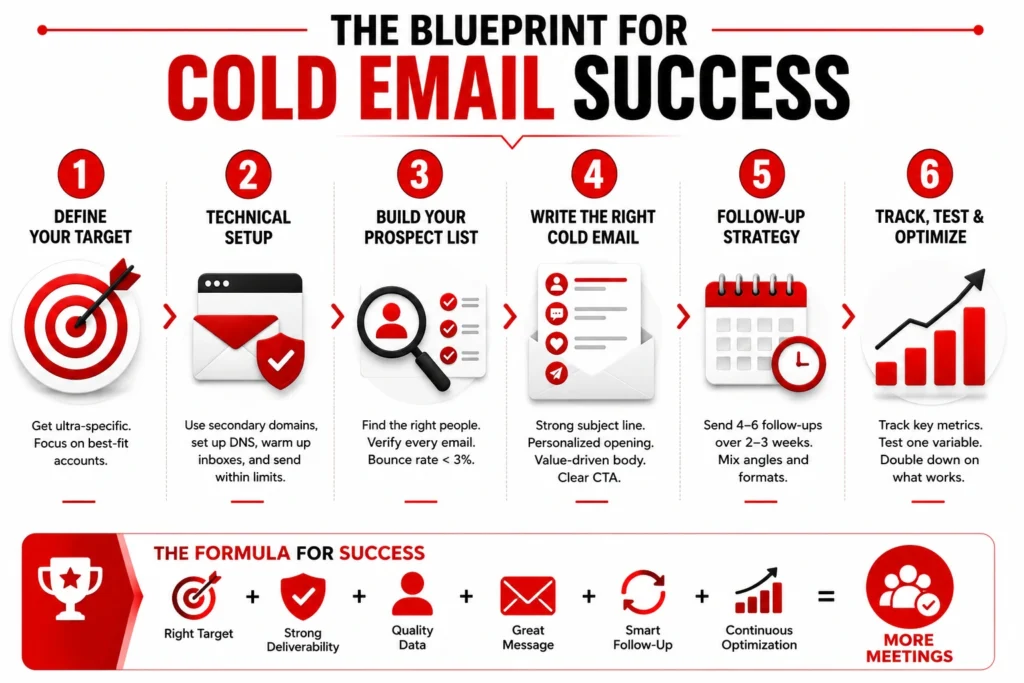
The Exact Blueprint for Cold Email Success
Now that you know cold email is alive and well, you are probably wondering how to actually build a winning campaign from scratch. It is not about writing a clever message and hoping for the best. It requires a highly systematic approach.
Here is the step-by-step framework I use to build campaigns that book meetings consistently.
Step 1: Define Your Target
Before you write a single word, you need to know who you are writing to. Sending the same email to every business in your city is a fast way to get zero replies.
You need to define your ideal customer profile.
An ideal customer profile (ICP) is a clear description of the perfect company to buy your product. “B2B tech companies” is not an ICP. That is way too broad.
A real ICP looks like this: Software companies in Texas, with 50 to 200 employees, using Salesforce, who just hired a new Sales Director.
When your list is that tight, your email practically writes itself. You know their exact pain points. This highly targeted approach is the backbone of account-based marketing. You pick the best targets, and you ignore everyone else.
Step 2: The Technical Setup (Do Not Skip This)
If you ignore this section, nothing else in this guide matters.
Trying to send 5,000 cold emails from your personal Gmail account is a great way to meet the spam folder permanently. If you set up your email infrastructure wrong, no one will ever see your messages.
Here is how I recommend you protect your email deliverability.
Buy Secondary Domains
Never send cold emails from your main company domain.
Let’s say your main website is YourCompany.com. If you send a cold campaign from that domain, and a few people mark it as spam, your domain gets flagged. Suddenly, your normal emails to clients and staff start going to spam.
You must protect your main domain. Buy secondary domains that look similar. Buy TryYourCompany.com or YourCompanyHQ.com. Use these new domains just for cold outreach. If one gets a bad reputation, you just pause it and buy a new one.
Set Up Your DNS Records
You need to prove to Google that you are a real person, not a scammer. You do this by adding three text records to your domain settings.
- SPF: This tells the internet which IP addresses can send emails for you.
- DKIM: This adds a hidden digital signature to your emails. It proves no one tampered with your message in transit.
- DMARC: This tells receiving servers what to do if an email fails the SPF or DKIM test.
If you lack these three records, your emails will bounce. It takes ten minutes to set them up. Just search your domain host’s help center.
Warm Up Your Inboxes
If you buy a domain on Monday and send 400 emails on Tuesday, you will get blocked. You look exactly like a spammer.
New domains have zero trust. You have to build that trust slowly using email warm up tools.
These tools connect to your inbox. They send a few emails a day to other real people in their network. They automatically open your emails, reply to them, and mark them as “not spam.” This tricks the algorithms into thinking you are a highly trusted sender.
Run your warmup tool for at least 14 to 21 days before you send a real campaign.
The Daily Sending Limit
Even when your domain is perfectly warm, you have speed limits.
Never send more than 30 to 40 cold emails per inbox, per day.
If you need to send 300 emails a day, do not push one inbox to the limit. That will ruin your trust score. Instead, buy ten different inboxes across three different domains. Have each inbox send 30 emails. That is how you scale safely.
Step 3: Build Your Prospect List
A great email sent to a terrible list will fail. An average email sent to a perfect list will win. Your data quality is everything when doing sales prospecting.
Sourcing Your Data
Do not buy cheap lists online. You need accurate data to reach the right inbox.
Use professional sales intelligence databases. These sales prospecting tools let you filter by job title, company size, and even the software a company uses.
You can also use LinkedIn prospecting to find highly active decision-makers. Find people who recently changed jobs or posted about a problem you solve. If you want a deep dive on list building, read my guide on how to build a prospect list.
Verifying Every Single Email
People change jobs. Companies go out of business. Email addresses die.
If you send an email to a dead address, it bounces back to you. If your bounce rate goes over 3%, your sender reputation drops. If it goes over 8%, your account could get suspended.
You must verify your list before you send. Use a tool to check the servers and make sure the email addresses still exist. Delete all the risky ones. Only send to verified contacts.
Step 4: How to Write a Cold Email
Most cold emails are painful to read. They are long, boring, and all about the sender. Busy executives do not read long essays from strangers.
You need to learn how to write a cold email that is short, punchy, and focused entirely on their problems. Let’s break down the anatomy of a perfect message.
The Subject Line
The subject line has exactly one job: get the prospect to open the email. It is not there to sell your product.
Keep it short. Three to five words is the sweet spot. Make it look like an internal email from a coworker. For more ideas, you can check out my favorite cold email subject lines.
Good Examples:
- idea for [Company]
- your recent LinkedIn post
- question about the sales team
Bad Examples:
- Boost Your ROI by 300% Today!!! (Looks like an ad)
- Quick Question (Too boring)
- Re: Our previous meeting (This is a lie, and lying kills trust)
The Opening Line
The first sentence is crucial. It shows up as the preview text on their phone.
Never start with “I hope this email finds you well.” It wastes valuable space. Never start with “My name is Bob and I work at XYZ Corp.” They do not care who you are yet.
You need strong cold email personalization. Mention a recent news article about them. Bring up a podcast they were on. Mention a hiring push they are doing.
Example: “I saw you just hired three new account executives in Chicago.”
This proves you are a human writing to another human.
The Body Paragraph
Now, connect your opening line to a problem they probably have.
Keep your whole email between 50 and 100 words. Do not list all your features. Do not attach a PDF brochure. Just state the problem and hint at how you fix it. You can review my cold email templates for clear structure ideas.
Example: “Most teams expanding that fast struggle to ramp up new reps. I built a platform that cuts onboarding time in half by organizing all your sales scripts in one place.”
The Call to Action (CTA)
The CTA is the question at the end of your email. You want to make it incredibly easy for them to answer.
Do not ask for a “quick 30-minute call.” 30 minutes is a huge ask for a busy VP. Instead, ask for interest.
- Are you the right person to chat with about this?
- Is this a priority for your team right now?
- Worth exploring?
They can answer these questions with a simple “yes” or “no.” Low friction equals more replies.
The Signature
Keep it simple. Just your name, your title, and a link to your company or LinkedIn.
Do not include a massive image of your company logo. Do not add motivational quotes. Heavy signatures with lots of code trigger spam filters. Plain text is always better.
Step 5: Follow-Up Sequences
If you only send one email and give up, you are wasting your time. Over 50% of your replies will come from your follow-up emails.
People are busy. They might read your first email, think it sounds interesting, and then get distracted by a phone call. You have to bump the thread back to the top of their inbox with a gentle reminder email.
The Timeline
The best sequences use three or four emails spread across two weeks.
- Email 1 (Day 1): Your main personalized pitch.
- Email 2 (Day 4): A quick value add. Do not just say “checking in.” Share a quick tip or a short, relevant case study.
- Email 3 (Day 9): A new angle. If your first pitch was about saving money, make this one about saving time.
- Email 4 (Day 14): The breakup email.
The Magic of the Breakup Email
The final email in your sequence is called the breakup email. It usually gets the highest reply rate of the whole campaign.
The psychology is simple. You tell them you are going to stop emailing them. This removes all the sales pressure. If they actually wanted to talk but were just busy, they will suddenly reply to stop you from walking away.
Example: “Hi Sarah, I’ve reached out a few times and haven’t heard back. I assume this isn’t a priority right now, so this will be my last email. If things change, feel free to reach out. Keep up the great work!”
Step 6: Tracking Your Metrics
You cannot fix a broken campaign if you do not know your numbers. You need to check your dashboard every single week to see what is working in your B2B sales process.
1. Open Rates
Open rates are tricky today. Apple and Google often use privacy features that automatically “open” emails in the background. This inflates your numbers.
Still, use it as a baseline. Aim for an open rate above 50%. If it drops below 30%, you have a serious problem. Either your subject lines are awful, or your emails are landing in the spam folder.
2. Reply Rates
This is the most important metric for your copy. Aim for a 3% to 5% positive reply rate.
If you are getting over 8%, do not touch anything. You are crushing it. If your reply rate is under 1%, stop sending. Your message does not resonate with your list. You either need a new list or a totally different pitch.
3. Bounce Rates
Keep your bounce rate under 2%. If it spikes to 5% or 10%, your list is dirty. Pause the campaign immediately and verify your contacts again.
4. Meetings Booked
This is the ultimate goal. You want to generate a sales qualified lead. Track how many qualified meetings you actually put on the calendar. That proves your ROI and helps with sales qualification framework tracking.
When you get them on a call, you move into the discovery call phase, handle any sales objection handling, and finally apply your sales closing techniques.
Interactive Tool: Predict Your Cold Email ROI
Wondering how much revenue you can actually generate from a campaign if you hit the benchmarks above? I built this interactive calculator so you can map out your funnel.
Plug in your average deal size and tweak your reply rates to see exactly how many emails you need to send to hit your monthly revenue goals.
Predict Your Cold Email ROI
Adjust the sliders below to see how small improvements in your funnel impact your bottom line.
Advanced Strategies to Get More Replies
Once you have the basics running smoothly, you need to upgrade your tactics.
Signal-Based Outreach
Stop emailing people just because they have the title “VP of Marketing.” That is a static data point.
Instead, look for a signal. A signal means something just changed in their world. This is a core part of demand generation.
- Did they just raise a round of funding?
- Did they just post a job listing for a new tool?
- Did their CEO just go on a popular podcast?
Reaching out immediately after a signal gives you the perfect excuse to be in their inbox. “Hey, saw you just raised $5M. Usually, teams use that capital to overhaul their tech stack. Is that on your radar?”
Multichannel Outreach
Do not rely entirely on the inbox. The best campaigns combine email with the phone. Instead of choosing between email and cold calling, use them together.
For example, if you notice a prospect opening your email multiple times, pick up the phone and call them. That extra touch drastically increases your chances of booking a meeting.
Essential Tools for Cold Emailing
You cannot run a real campaign from your personal Gmail app. You need dedicated software to handle the volume and tracking without getting blocked by Google.
Sending Platforms
You need a solid cold email software to connect all your inboxes, automate the daily sending limits, and track your replies. There are several great platforms on the market that handle this perfectly. If you want a deep dive into a top-tier option, you can read my full Instantly AI review.
Data and Deliverability
To find great contacts with accurate phone numbers and active inboxes, you will need strong lead generation software. These databases fuel your entire outreach workflow.
Once you have your target list, you also need to keep those messages out of the spam folder. Make sure you use the best email deliverability tools to warm up your domains and protect your sender reputation over time.
The AI Warning
Everyone is talking about AI lead generation right now. AI definitely changed outbound sales, but not in the way most people think.
A couple of years ago, everyone was using ChatGPT to write their entire sequence. Today, if you do that, Google will throw your email straight into the spam folder. Modern spam filters are specifically trained to look for obvious AI words and robotic sentence structures.
Never let AI write your final draft.
Instead, use AI as your research assistant. Ask it to clean up messy data lists or suggest subject line ideas. But when it is time to write the actual email, a human needs to do it. Keep it simple and use your own voice.
Conclusion
Mastering cold email takes patience. You will have campaigns that flop. You will write subject lines that nobody opens. You will have to tinker with your setup.
But once it clicks, it is the most powerful tool in your business.
You gain the ability to generate interest out of thin air. Build a hyper-specific list. Set up your domains so you never hit the spam folder. Verify your data. Write short emails that actually care about the buyer’s problem. And always follow up.
Do the work, respect the inbox, and the meetings will follow.